

Description
Product File Upload for WooCommerce is the ultimate solution to collect files from your customers directly on the product single page. Whether you sell personalized mugs, custom t-shirts, or professional services that require document submissions, this plugin makes the process seamless and professional.
With AJAX background uploading, your customers don’t have to wait for the page to reload. Files are uploaded the moment they are dropped, ensuring a smooth and conversion-friendly checkout experience.
Key Benefits:
- Background AJAX Uploads: Files upload instantly upon selection, preventing timeouts and form submission issues.
- Multiple File Support: Let customers upload one or many files with ease.
- Order Integration: Uploaded files are automatically linked to the WooCommerce order, visible to both customers and admins.
- Responsive & Mobile-Ready: Works perfectly on desktops, tablets, and smartphones.
- Daily Cleanup: Automatically manages temporary storage to keep your server clean.
DEMO: View Live Demo
PRO VERSION: Upgrade for Pro Features
DOCUMENTATION: Setup Guide
Features
- Modern Drag & Drop UI: A beautiful, intuitive upload area that fits any WooCommerce theme.
- AJAX Progress Bar: Real-time feedback for file upload status.
- Individual Product Control: Enable or disable the upload field specifically for certain products.
- File Type & Size Validation: Restrict uploads by extension (JPG, PDF, ZIP, etc.) and set MB limits.
- Image Thumbnails: (Pro) Show instant previews of uploaded images.
- Multilingual Support: Fully compatible with WPML, Polylang, and Loco Translate.
- Email Attachments: Send uploaded files directly as email attachments to the store admin.
Screenshots

Professional Drag & Drop area on the product page. 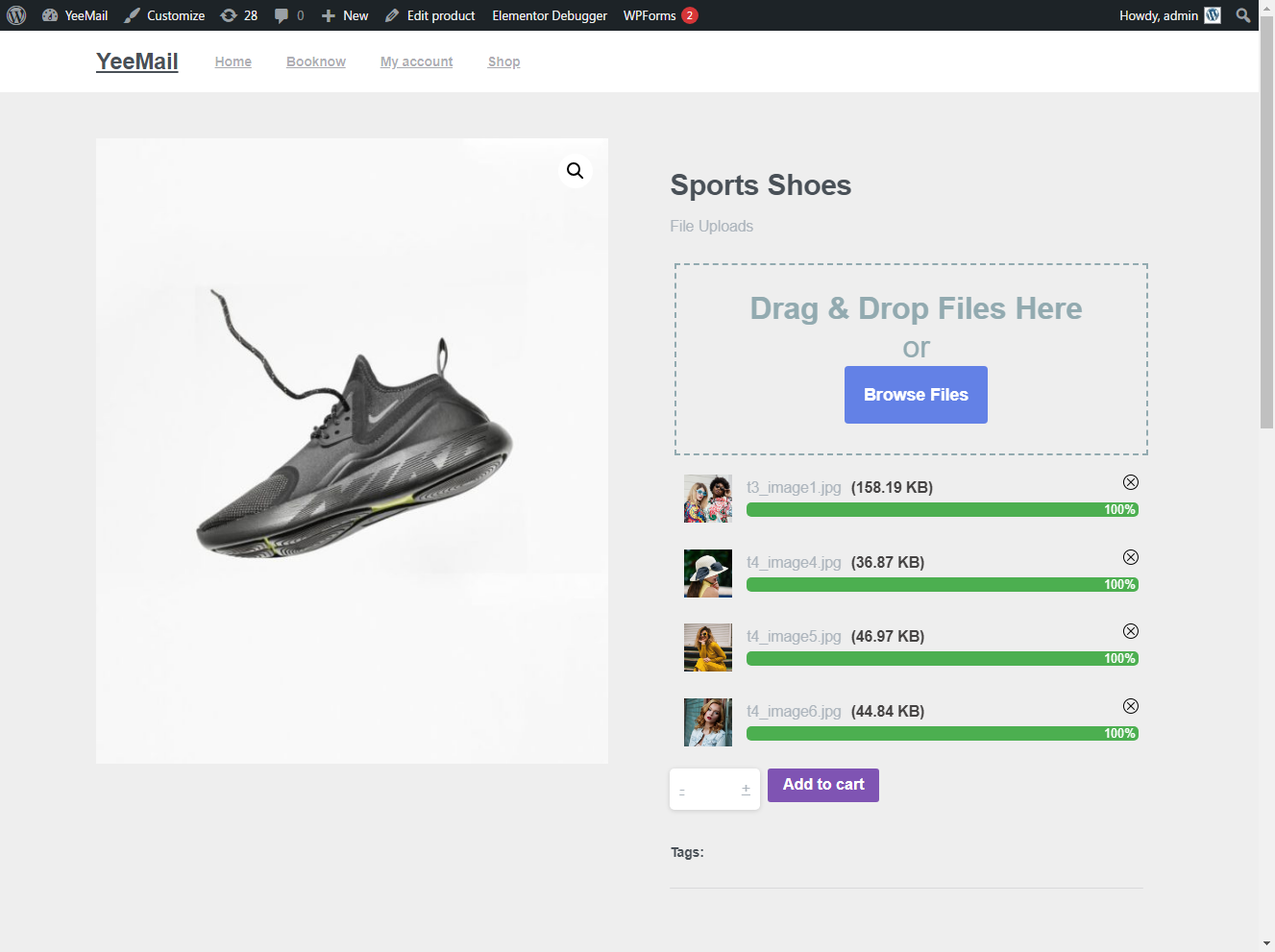
File upload progress and success feedback. 
Uploaded files listed in the WooCommerce Order details. 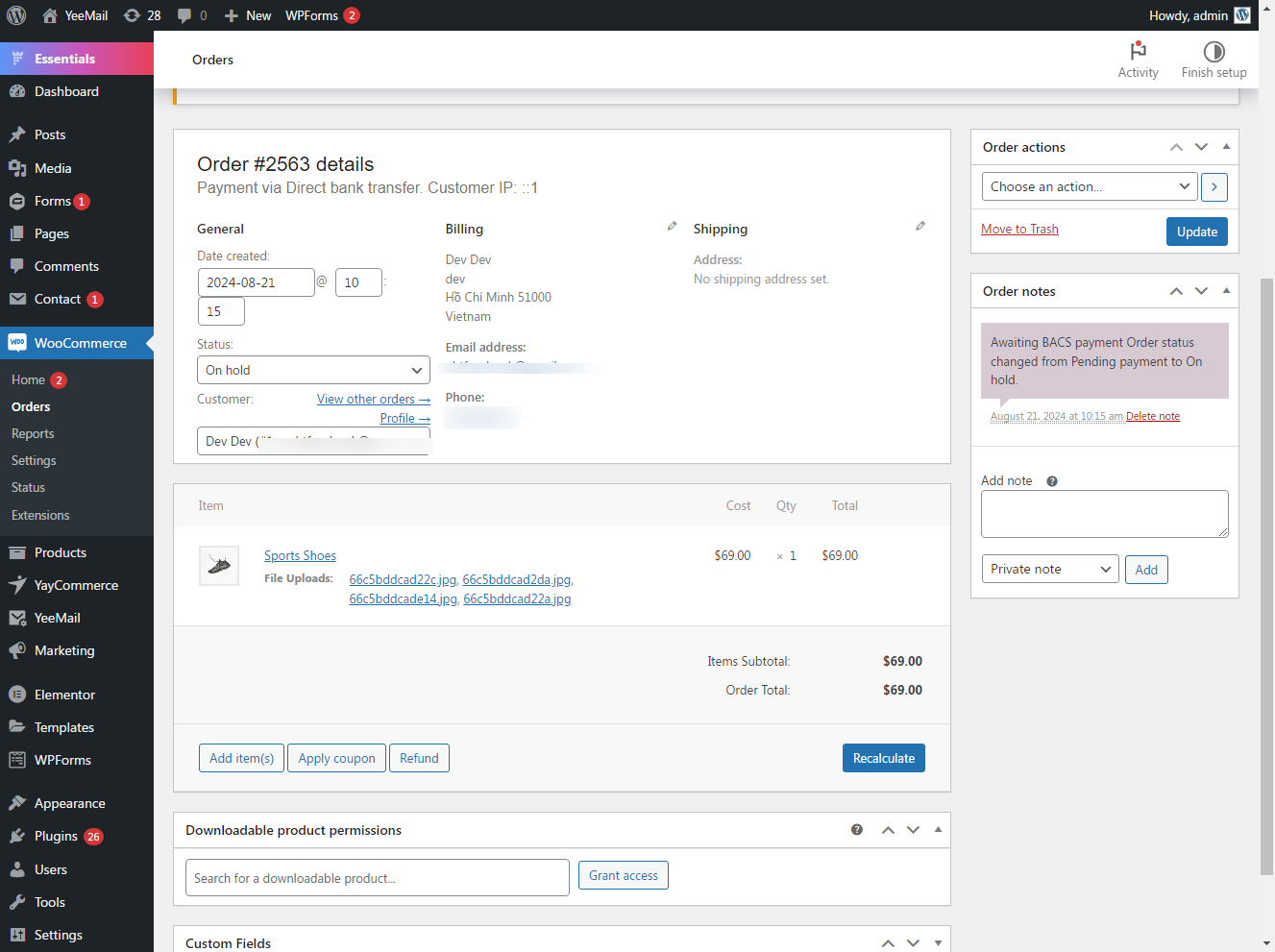
Installation
- Log in to your WordPress Dashboard.
- Go to Plugins > Add New.
- Search for Product File Upload for WooCommerce”.
- Click Install Now and then Activate.
- Navigate to WooCommerce > Settings > Products uploads to configure global settings.
- (Optional) Edit any product to override global upload settings for that specific item.
FAQ
-
Can I see the uploaded files in the order?
-
Yes, once a customer completes an order, the links to the uploaded files appear in the Order Details page on the admin side and in the customer’s My Account” area.
-
Does it support multiple file uploads?
-
Yes! You can configure the Max files” limit in the settings to allow customers to upload multiple files per product.
-
Can I restrict specific file types?
-
Absolutely. You can define allowed file extensions (e.g., jpg, pdf, docx) in the plugin settings to ensure you only receive the types of files you need.
-
Does it work with Variable Products?
-
Yes, it works perfectly on both simple and variable WooCommerce product types.
Reviews


Contributors & Developers
“Product File Upload for WooCommerce” is open source software. The following people have contributed to this plugin.
Contributors


Translate “Product File Upload for WooCommerce” into your language.
Interested in development?
Browse the code, check out the SVN repository, or subscribe to the development log by RSS.
Changelog
2.2.8
- FIXED: Required file upload not working on product page.
2.2.6
- IMPROVED: Refactored internal code for better performance and security.
- UPDATED: Optimized readme for SEO and better user guidance.
- FIXED: Improved AJAX file handling and multi-file count stability.
2.2.5
- FIXED: Resolved arbitrary file deletion vulnerability.
2.2.1
- UPDATED: Fully compatible with WordPress 6.9 and WooCommerce 6.0+.
1.0.0
- Initial Release.