
Description
Reqad Cache Purger keeps an Nginx FastCGI page cache in step with WordPress. It
adds a Purge Nginx Cache” button to the admin bar for clearing the whole site,
and purges the affected pages by itself whenever content changes.
It works with nothing configured: the plugin sends an HTTP request to a /purge
location that Nginx handles, and the caching policy itself lives entirely in
your Nginx configuration. A Settings page exists for the optional extras – a
background cache warmer, a purge-endpoint override for sites behind a proxy, and
a cache self-test – but you can ignore all of it.
What it purges
- Admin-bar button – the entire cache, in a single wildcard request.
- A post or page published, updated, unpublished or trashed – its permalink, the
home page and its public taxonomy archives. - A WooCommerce product – the above, plus the shop page.
- A term created, edited or deleted in any public taxonomy – its archive and the
home page.
Post types with no front-end URL (menu items, revisions, WooCommerce orders and
similar) are skipped, because they were never cached in the first place.
Requirements
This plugin does not cache anything itself – Nginx does. It requires Nginx built
with the ngx_cache_purge module from https://github.com/nginx-modules/ngx_cache_purge
– the actively maintained continuation of Piotr Sikora’s original module, which
passed through torden’s fork around 2017. If you have seen it called the Torden
fork”, that is the same lineage.
The abandoned FRiCKLE repository will not work: the admin-bar button clears the
site with a single wildcard request, and wildcard purging landed after FRiCKLE
development stopped around 2015.
Check yours with:
nginx -V 2>&1 | tr ' ' '\n' | grep cache_purge
Full Nginx configuration, including a tested FastCGI cache setup with
WooCommerce-safe bypass rules, is in README.md in the plugin folder.
Screenshots
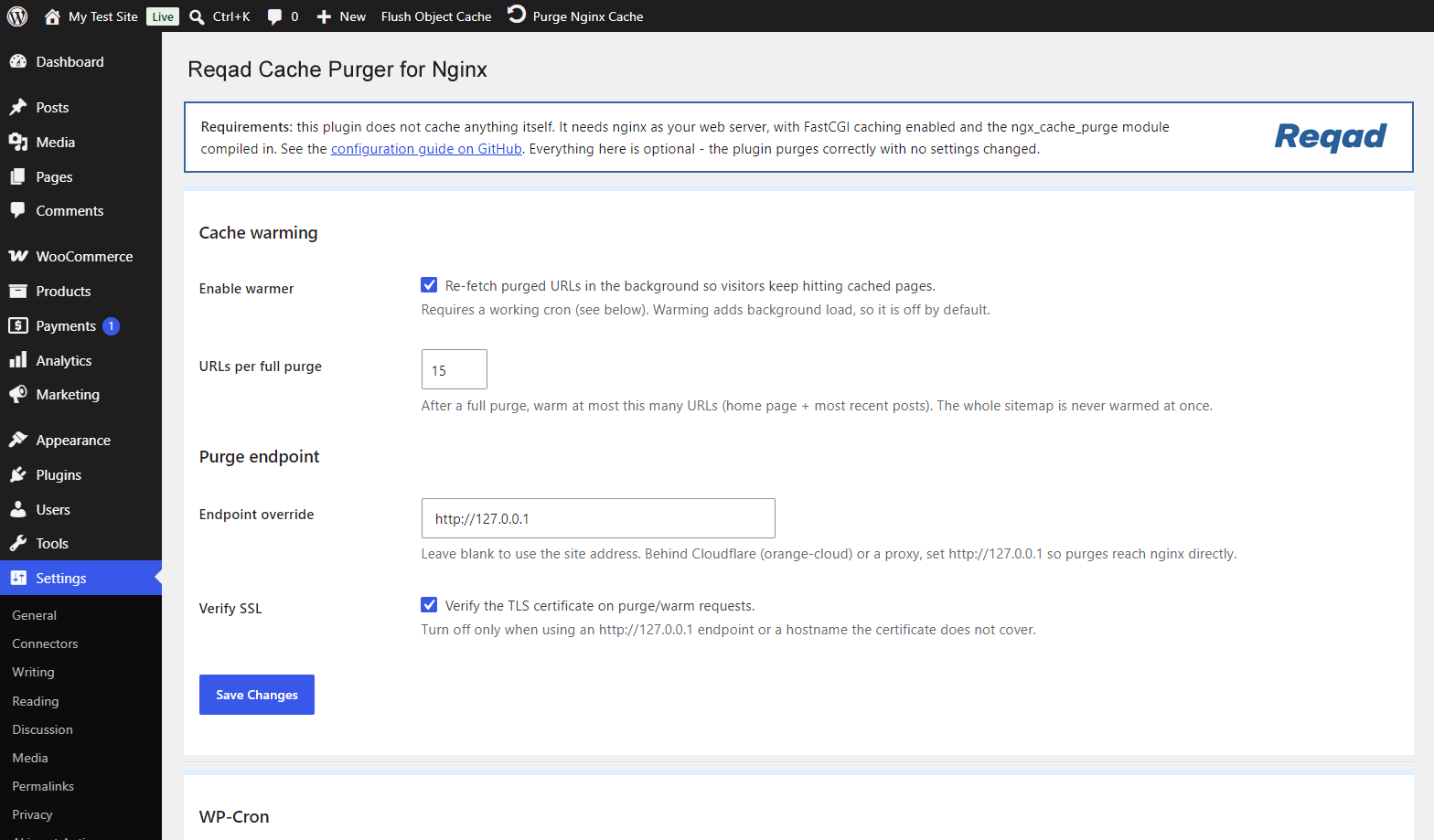
Installation
1. Nginx
You need a working FastCGI cache and a purge location. Minimal version – see README.md for the complete configuration:
In the http context (the top of your site’s file in conf.d/ is fine):
fastcgi_cache_path /var/cache/nginx/wpcache levels=1:2 keys_zone=wpcache:100m
                   inactive=12h max_size=512m;
In server { }:
location ~ ^/purge(/.*) {
    allow 127.0.0.1;
    allow ::1;
    allow 203.0.113.10;   # this server's own public IP
    deny  all;

    cache_purge_response_type json;
    fastcgi_cache_purge wpcache "$scheme$host$1";
}
In the PHP location:
open_file_cache          off;
fastcgi_cache            wpcache;
fastcgi_cache_key        "$scheme$host$request_uri";
fastcgi_cache_methods    GET;
fastcgi_cache_valid      200 301 302 12h;
fastcgi_ignore_headers   Cache-Control Expires;
Three things that catch people out:
- Use
$request_uri, not$uri, in the cache key. WordPress routes everything throughtry_files ... /index.php, so$uribecomes/index.phpand the whole site collapses onto one cache entry. - Leave
$request_methodout of the key, and setfastcgi_cache_methods GET. Otherwise GET and HEAD are stored separately and the HEAD copies can never be purged. - If you set a global
open_file_cache, turn it off in the cached location. Nginx caches the descriptors of cache files too, so purges appear to do nothing for up toopen_file_cache_validseconds.
The key expression in the purge location must match fastcgi_cache_key exactly,
with $1 in place of the path. If they differ, every purge returns 412.
Then:
nginx -t && systemctl reload nginx
2. The plugin
- Upload the
reqad-cache-purgerfolder towp-content/plugins/, or install the zip through Plugins > Add New > Upload Plugin. - Activate it through the Plugins menu.
There is nothing to configure. The purge URL is derived from your site address.
3. Check it
curl -sI https://example.com/ | grep -i x-fastcgi-cache   # MISS
curl -sI https://example.com/ | grep -i x-fastcgi-cache   # HIT
curl -s  https://example.com/purge/                       # {"Status": "purged"}
curl -s  "https://example.com/purge/*"                    # 200 = correct module
Add add_header X-FastCGI-Cache $upstream_cache_status always; while testing.
FAQ
-
Does this plugin cache my pages?
-
No. Nginx does the caching; this plugin only tells it what to throw away.
-
Why doesn’t it work with the FRiCKLE ngx_cache_purge module?
-
That module purges one exact key per request and has no wildcard support, so the
purge everything” button cannot work. It has also been unmaintained since 2015
and no longer builds against current Nginx. Use
https://github.com/nginx-modules/ngx_cache_purge instead. -
Purges return 403.
-
The request is not reaching Nginx from an address in your
allowlist. The
plugin calls the site’s own public hostname, so the source address is normally
the server’s public IP – not 127.0.0.1. Behind a proxy that sets
real_ip_header,$remote_addrbecomes the visitor’s address instead; in that
case point the plugin at your origin with thengxcp_purge_endpointfilter. -
Purges return 412.
-
412 means this key was not in the cache”. For a page nobody has requested yet
that is normal and the plugin treats it as success. If it happens for pages that
are definitely cached, your purge-location key expression does not match
fastcgi_cache_key. -
Nothing happens when content changes.
-
Enable
WP_DEBUGandWP_DEBUG_LOG. Every purge attempt is logged to
wp-content/debug.log with anNGXCP:prefix, including the URL and HTTP status. -
Can I change where purge requests are sent?
-
Yes, with the
ngxcp_purge_endpointfilter.ngxcp_purge_sslverifycontrols
certificate verification, andngxcp_paths_for_postcontrols which paths are
purged when a post changes. See README.md. -
Does it work with WooCommerce?
-
Yes. Product and product-category purging switch on automatically. Make sure
your Nginx bypass rules exclude cart, checkout, my-account and the WooCommerce
session cookies – the configuration in README.md does. -
Can I use it with WP Rocket, W3 Total Cache or LiteSpeed Cache?
-
Not for page caching, no. Those plugins store rendered HTML themselves, and
Nginx then caches their output – two caches with two lifetimes and two purge
mechanisms that know nothing about each other, so pages go stale in ways no
single purge fixes. Turn page caching off in the other plugin (its minification,
database and CDN features are fine to keep), or drop the fastcgi_cache
directives from your vhost and let that plugin do the caching. The Settings page
warns you when it detects one.Object caches such as Redis Object Cache work fine – they are a different layer.
-
Site Health says Page cache is not detected”.
-
Core’s test looks for a fixed list of caching headers and does not know
x-fastcgi-cache. The plugin registers the header with core, so the test should
pass once this plugin is active. If it still does not, either the cache status
header is missing from your vhost, or the home page is being bypassed – run the
cache self-test on the Settings page to see which. You can also emit the name
core already knows:add_header X-Cache-Status $upstream_cache_status always;.
Reviews
There are no reviews for this plugin.
Contributors & Developers
“Reqad Cache Purger for Nginx” is open source software. The following people have contributed to this plugin.
Contributors
Translate “Reqad Cache Purger for Nginx” into your language.
Interested in development?
Browse the code, check out the SVN repository, or subscribe to the development log by RSS.
Changelog
1.1.1
- New: the Settings page warns when another full-page cache plugin is active
(WP Rocket, W3 Total Cache, WP Super Cache, LiteSpeed Cache and others), or
when an unidentified advanced-cache.php drop-in is loaded. Two page caches
stacked on each other cause stale pages that a purge cannot fix. - New: also warns, less loudly, about other Nginx purgers.
- Fixed: WordPress Site Health reported Page cache is not detected” on properly
configured sites, because core does not know the X-FastCGI-Cache header. The
plugin now registers it. - The cache self-test and warmer accept X-Cache-Status and X-Proxy-Cache as well
as X-FastCGI-Cache. - Settings page polish: a requirements note, the conflict warning shown as a red
WARNING box, a WP-Cron panel that confirms (and hides its setup steps) once the
worker has run in the last 3 minutes, and footer links to the setup guide and a
GitHub star.
1.1.0
- New: optional background cache warmer. When enabled, purged URLs are re-fetched
on a cron tick so visitors keep hitting cached pages. A full purge warms a
bounded set (home page + recent posts), never the whole sitemap at once. - New: Settings page (Settings -> Nginx Cache Purger) – toggle the warmer, set a
purge-endpoint / SSL-verify override, a WP-Cron panel that can add
DISABLE_WP_CRON to wp-config.php and shows the last worker run, and a one-click
cache self-test built on the X-FastCGI-Cache header. - The purge endpoint and SSL-verify can now be set from the Settings page as well
as the filters; a code filter still wins. - New: Settings link on the plugin’s row in the Plugins list.
- All optional – with nothing configured the plugin behaves exactly as before.
1.0.2
- New purge triggers: a new or edited comment (and approve/unapprove/spam/trash)
now purges the post it belongs to. - Theme switch, nav-menu changes, widget changes and Customizer saves now purge
the whole cache, since they affect every page. - Multiple site-wide triggers firing in one request collapse into a single
wildcard purge.
1.0.1
- Security: the purge URL is built from the site address instead of the
client-supplied Host header, which could be spoofed into making the site issue
an outbound request to an attacker-chosen host. - Security: SSL verification on the purge request is enabled by default, with
thengxcp_purge_sslverifyfilter for setups that need it off. - Purging a post now also clears the home page, its taxonomy archives and, for
products, the shop page – previously only its own permalink. - Unpublishing, trashing and permanently deleting a post now purge. Previously
only transitions topublishdid, so content pulled offline stayed cached. - Deleting a term now purges; the old handler always bailed out because
delete_term fires after the term is already gone. - Term purging covers every public taxonomy, not only
product_cat. - Post types that are not publicly viewable no longer trigger purge requests.
- A 412 response (key not in cache) counts as success instead of an error.
- The admin-bar button reports through a WordPress notice instead of a
JavaScript alert, with a working spinner. - Fixed the front-end admin-bar button, whose script only loaded in wp-admin.
- Added the
ngxcp_purge_endpoint,ngxcp_purge_sslverifyandngxcp_paths_for_post
filters.
1.0.0
- Initial release: admin-bar purge button, automatic purging on post save, and
WooCommerce product and product-category purging.