Description
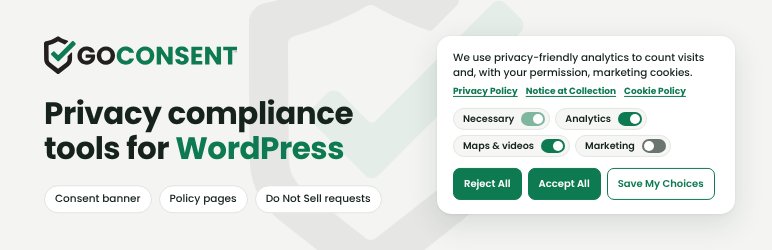
GoConsent — privacy compliance tools for WordPress. Cookies, policies, laws and scans in one plugin, with one setup designed for every US state’s privacy laws.
Privacy laws now reach small businesses. California, Colorado, Texas, Virginia, Oregon and more than a dozen other states require clear consent choices, an opt-out for targeted advertising, a respected Global Privacy Control signal and an up-to-date privacy policy. Lawsuits over tracking pixels and chat tools are growing every year. GoConsent sets up the technical pieces from one screen and tells you in plain English what is left to fix.
Free means free. No visit limits, no account, no cloud service and no forced branding. Everything runs on your own WordPress server, so nothing about your visitors leaves your site.
Who GoConsent is for
- Small businesses that want the privacy basics done right without a monthly bill: shops, contractors, salons, professional services.
- Agencies and web designers who manage many client sites and need one setup that works everywhere, including multisite networks.
- Real estate agents and brokers: listing maps and video tours keep working, with a check that your policy covers them.
- Restaurants: reservation and online ordering widgets (OpenTable, Resy, Tock, SevenRooms, Toast) keep working, with policy wording for reservations and allergies.
- Health, kids and finance sites: extra checks for sensitive, children’s and financial information.
- Nonprofits and publishers that want consent, policies and traffic stats without sending visitor data to another company.
How it works
- Install and accept the terms. Nothing runs and nothing leaves your site until you do.
- Tell GoConsent about your business: where you are, your industry and where your customers live. It works out which privacy laws likely apply to you.
- Scan. GoConsent reads your own pages (and your Google Tag Manager container) and lists every tracker, pixel, embed and cookie, and what adds each one.
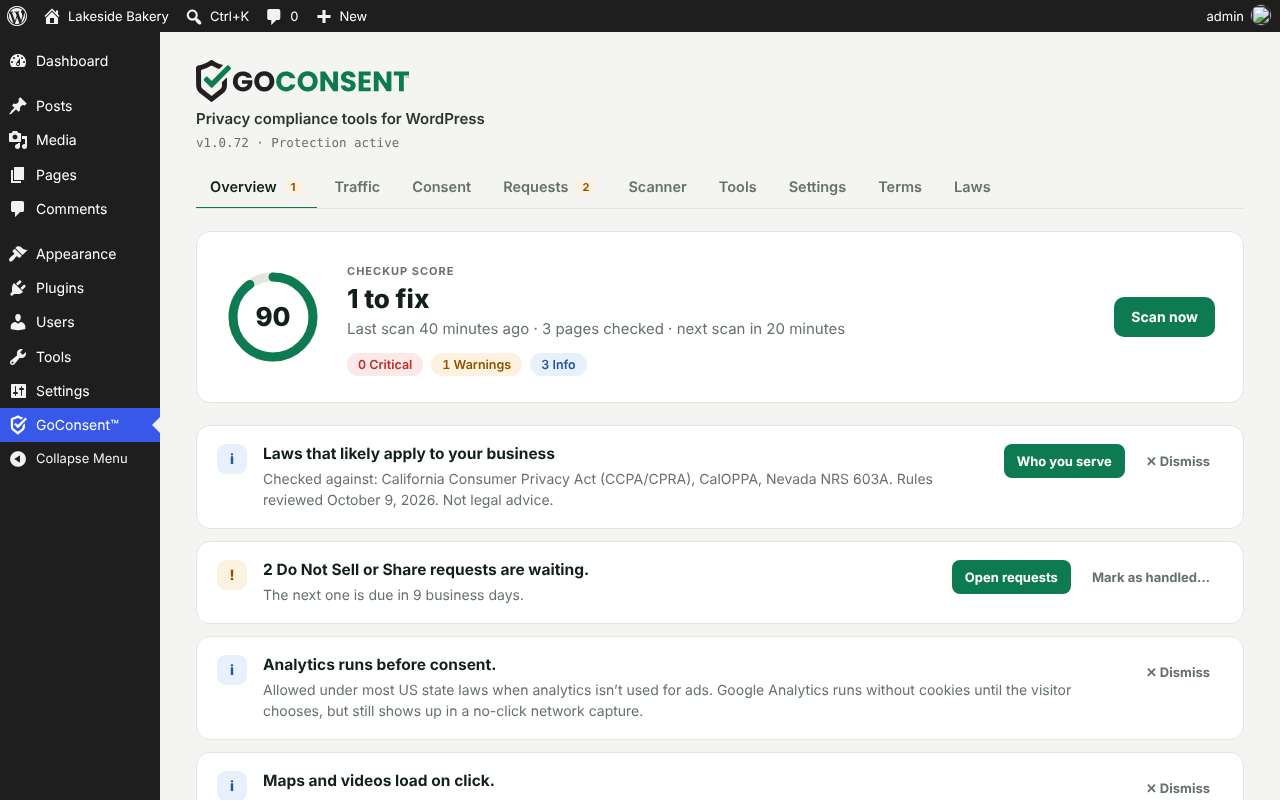
- Fix. The Overview shows a score and plain-English issues, sorted by what the law requires and what is best practice. Most fixes take one click.
- Publish your policies. Build your Privacy Policy, Cookie Policy, Refund & Returns Policy and Accessibility Statement in your own editor, then keep them current as your site changes.
What visitors see
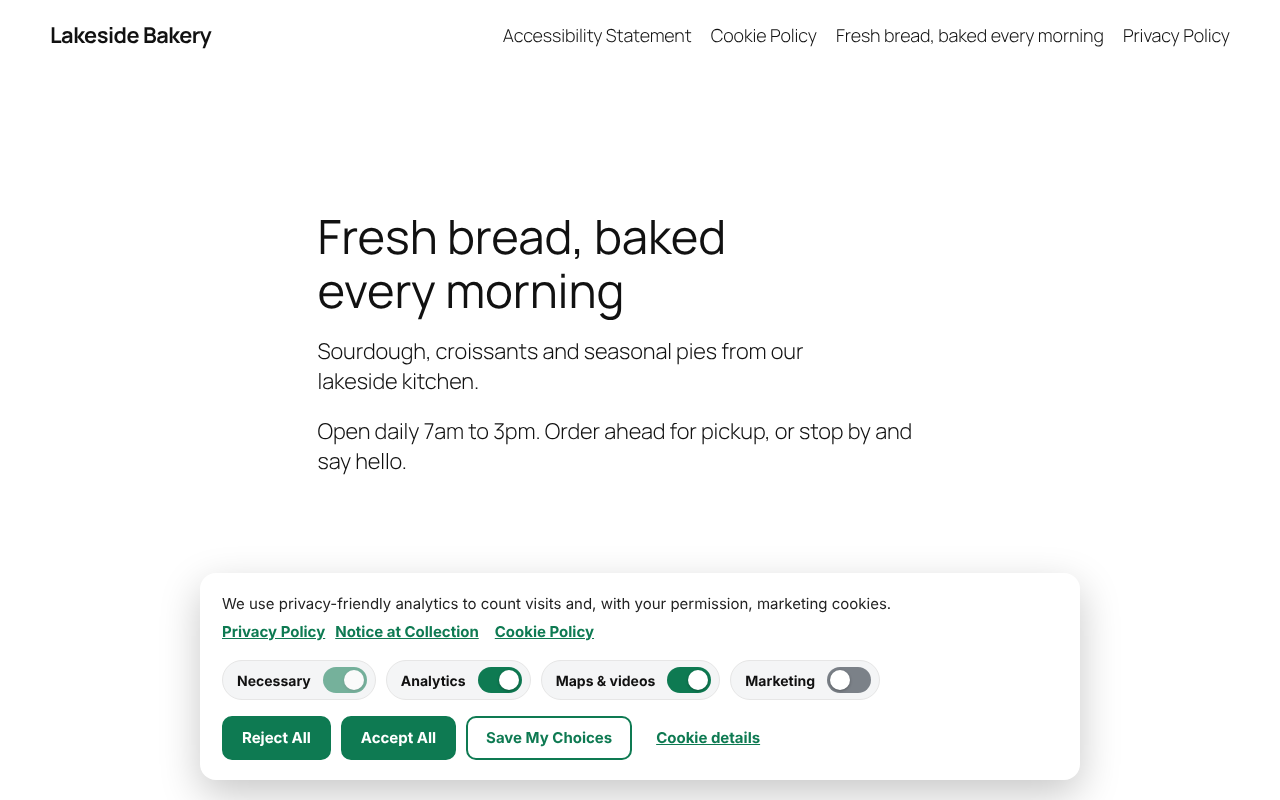
- A compact banner with equal Accept All and Reject All buttons, category switches, and links to your Privacy Policy, Notice at Collection and Cookie Policy.
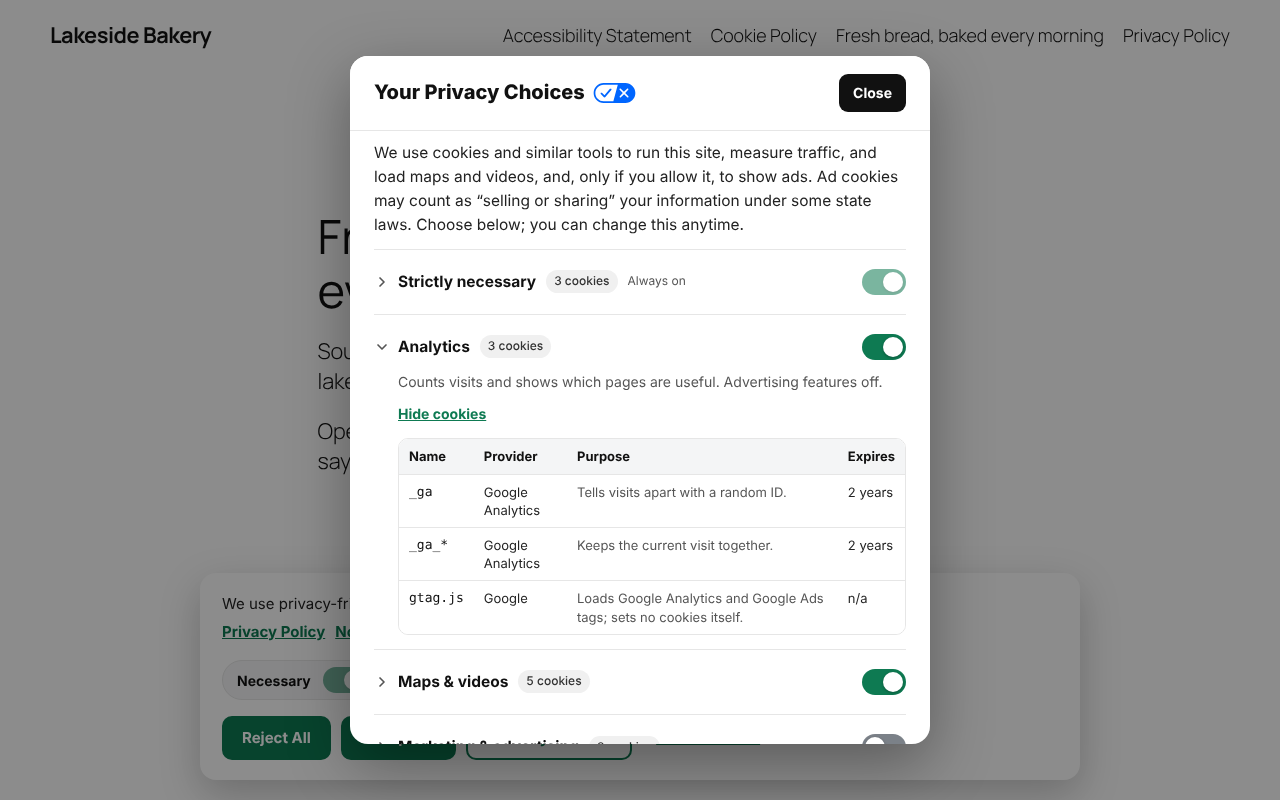
- Your Privacy Choices, a dialog with a short notice at collection, one collapsible section per category with its cookies, a consent receipt they can copy, and Opt out using your email.”
- A Your Privacy Choices” link with California’s opt-out icon in your footer, and a small privacy button that reopens their choices on any page.
- Click-to-load placeholders for maps and videos, so nothing contacts Google or YouTube until they agree.
What you see
- Overview: checkup score, issues and one-click fixes, plus a one-time question when a better default is available.
- Consent: every banner and privacy setting, saved instantly.
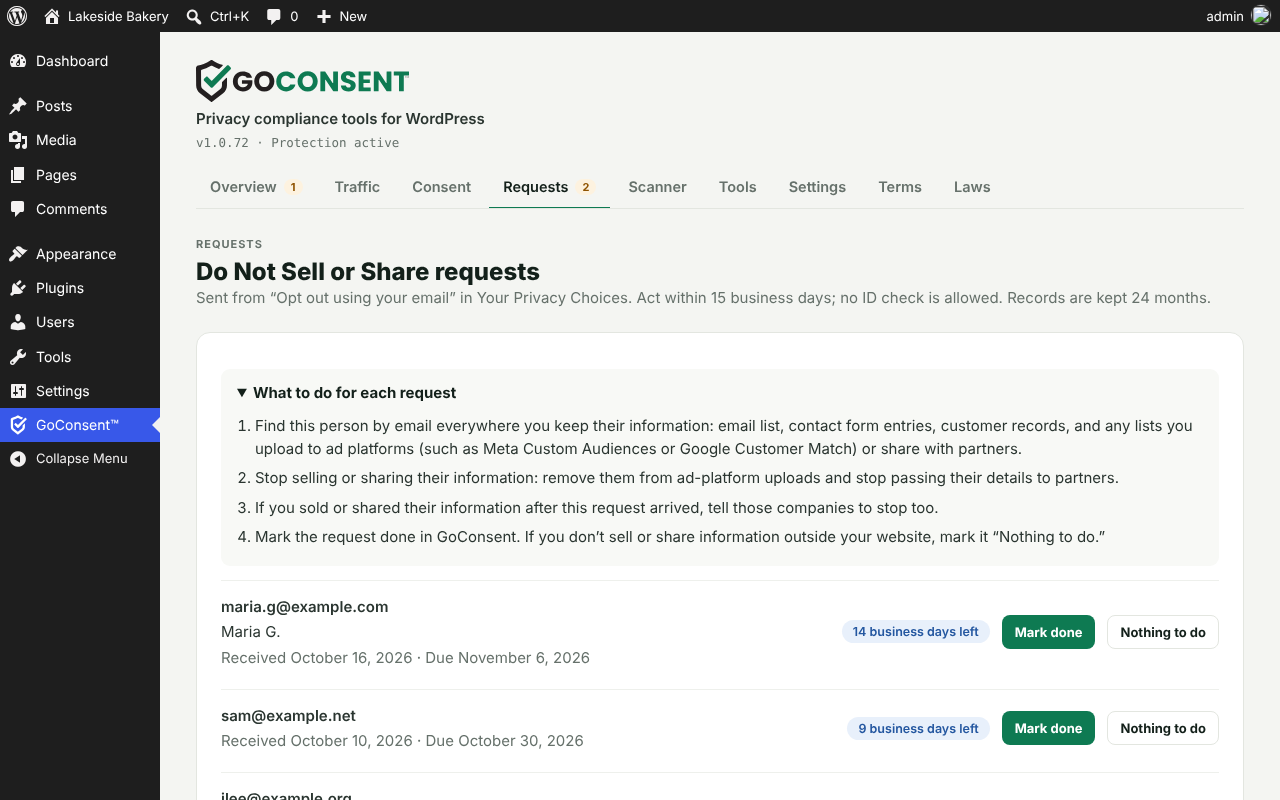
- Requests: Do Not Sell or Share requests with due dates and a checklist.
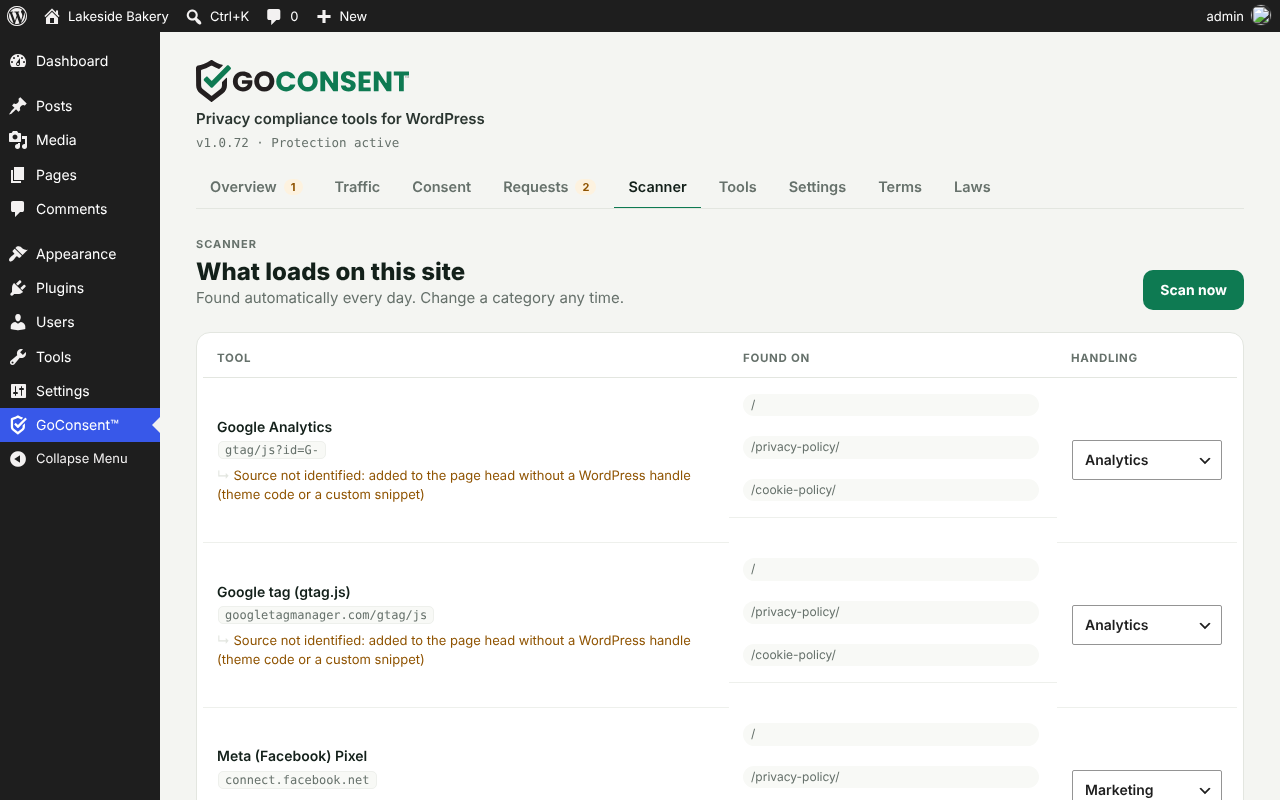
- Scanner: every tracker and cookie, its category and what adds it.
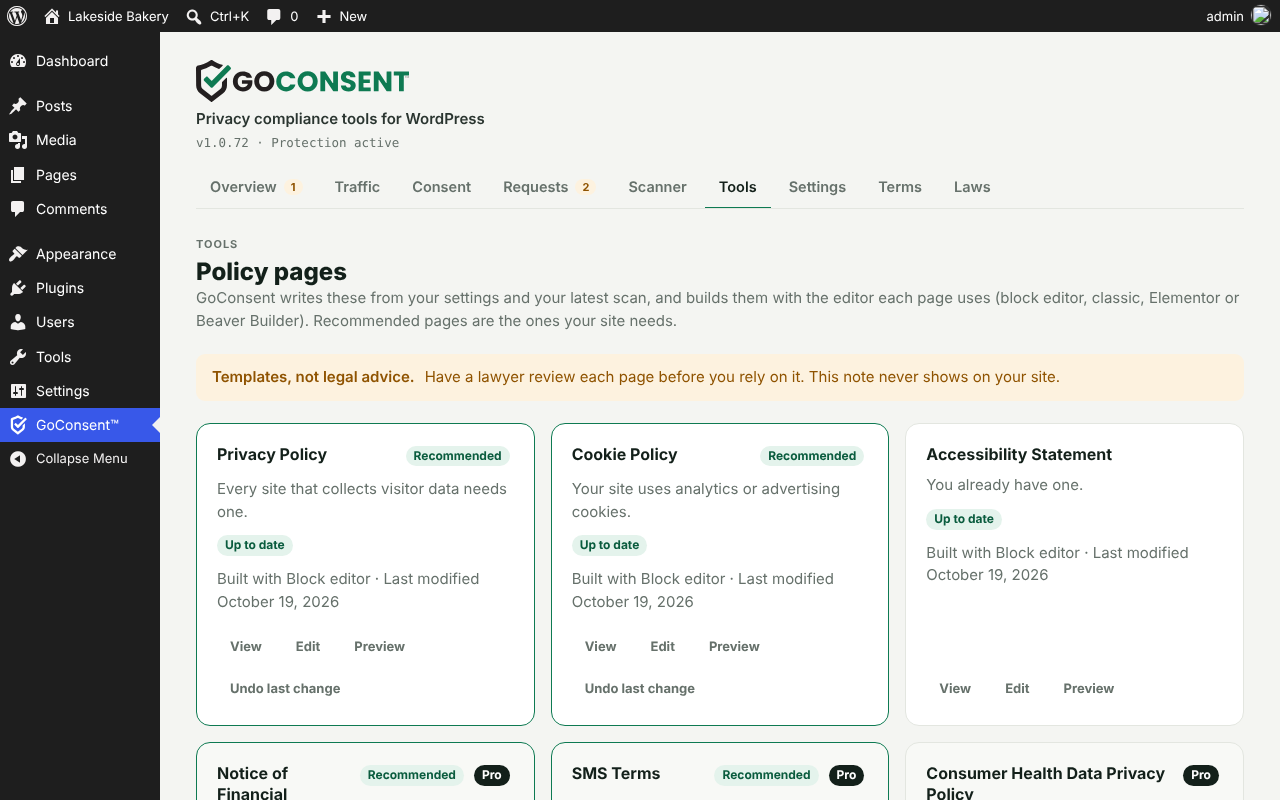
- Tools: your policy pages, built and updated in your editor.
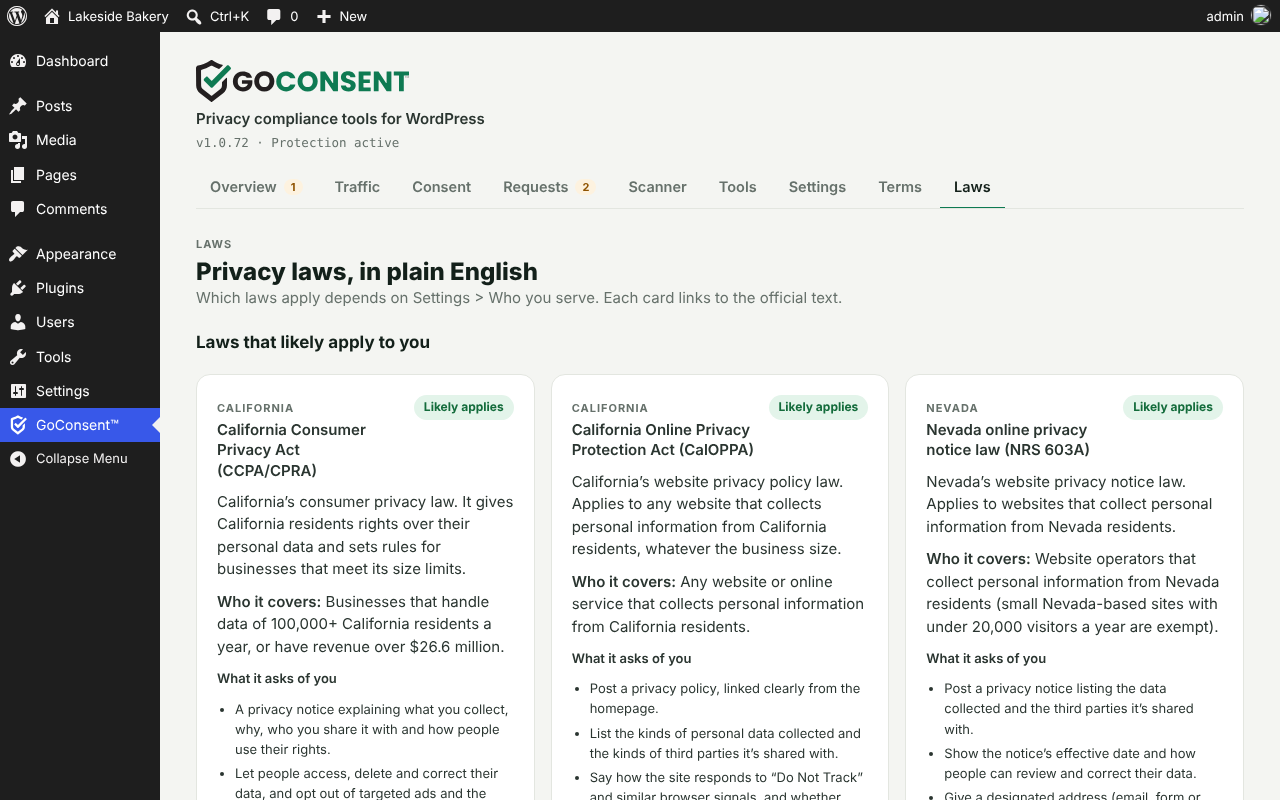
- Laws: the privacy laws that likely apply to you, in plain English, including laws starting soon.
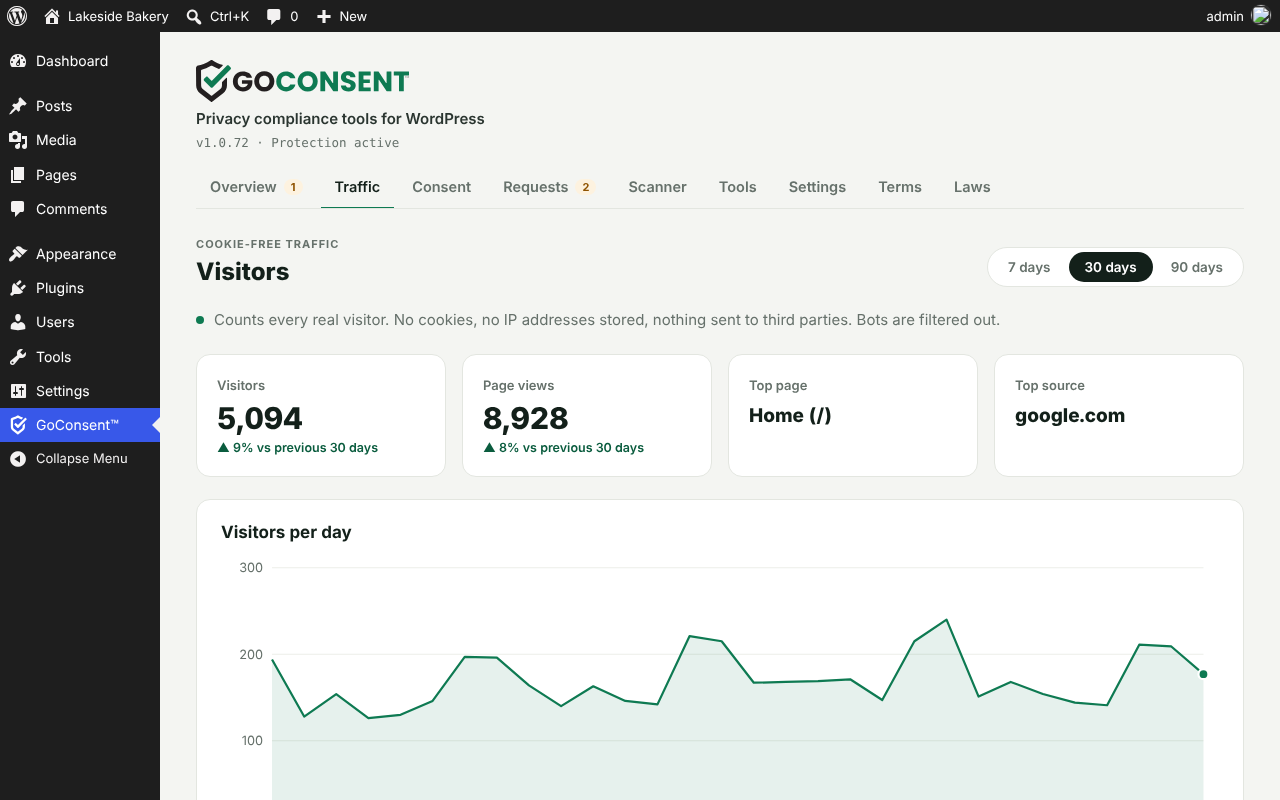
- Traffic: cookie-free visitor stats on your own server.
Cookie consent banner that blocks trackers before consent
- Equal Accept All and Reject All buttons, with category switches right on a compact banner that links to your Privacy Policy, Notice at Collection and Cookie Policy.
- Your Privacy Choices” panel with a short notice at collection, one collapsible section per category (analytics, advertising, maps and videos) and the cookies in each, plus California’s official opt-out icon on the Your Privacy Choices” footer link.
- Full cookie declaration. Every cookie and tracker the scan finds, with provider, purpose, type and expiry, listed by category for visitors and on your Cookie Policy page (
[goconsent_cookie_table]). - Consent receipt and privacy button. Visitors see their Consent ID and can reopen their choices from a floating GoConsent shield on any page.
- Real blocking, not just a notice. Google Analytics, Google Ads, Meta Pixel, TikTok, LinkedIn, Microsoft Clarity, Hotjar and other tags wait until the visitor agrees. Scripts that other plugins add later are held too.
- Google Consent Mode v2 with every signal set to denied” until consent, ad data redaction on, and Google Signals and ad personalization off until a visitor allows marketing. Meta Pixel gets the same consent signal.
- Global Privacy Control (GPC) honored automatically, as California, Colorado and other states require. Visitors are told the signal was honored, and a signed-in visitor’s GPC opt-out follows them to every device.
- Opt out using your email.” Visitors can ask you to stop selling or sharing information you hold about them outside the browser, with no account or ID. You get an email, a 15-business-day countdown, a step-by-step checklist and a reminder before the deadline.
- IAB Global Privacy Platform (GPP). Ad vendors that read
__gppget a US National signal that matches the visitor’s choice and GPC. - Analytics from the first page, privately. For US visitors, Google Analytics counts visits without cookies until they choose (you can turn this off). EU and UK visitors get stricter defaults automatically.
- Click-to-load Google Maps, Street View, YouTube and Vimeo, so a first visit makes no calls to Google.
- Optional self-hosted Google Fonts. Turn it on and fonts are copied to your server, so visitors never contact Google.
- Fast and cache-friendly. Works with page caching and loads a small script.
Cookie scanner and compliance report
- Daily cookie and tracker scan of your own pages finds tracking tags, pixels, embeds and unknown scripts, and shows which plugin, theme or page adds each one. It recognises 70+ services, including ad networks, session recorders and product analytics.
- Sees inside Google Tag Manager. Tags hidden inside your GTM container are listed too, so your cookie list and policies stay complete.
- Checkup score with plain-English issues, sorted by what the law requires for your business and what is only best practice.
- One-click fixes, plus suggested privacy policy wording you can copy or add to your policy.
- Email alerts when a new critical issue appears.
Do Not Sell or Share requests
- Opt out using your email” in Your Privacy Choices covers information you hold outside the browser (email lists, form leads, customer lists).
- Requests tab with each request’s due date, business days left, a step-by-step checklist and one-click close (Done” or Nothing to do”).
- Automatic emails: a receipt for the visitor, a notice to you, and a reminder 3 business days before the deadline. Records are kept 24 months as proof.
Privacy policy generator and policy pages
- Legal links in your footer, automatically: added to your footer menu or your block theme’s footer (or a slim bar), without repeating links you already have. Or place the block or shortcode yourself.
- Privacy Policy, Cookie Policy, Refund & Returns Policy and Accessibility Statement, written from your settings and your latest scan, with the services your site actually uses.
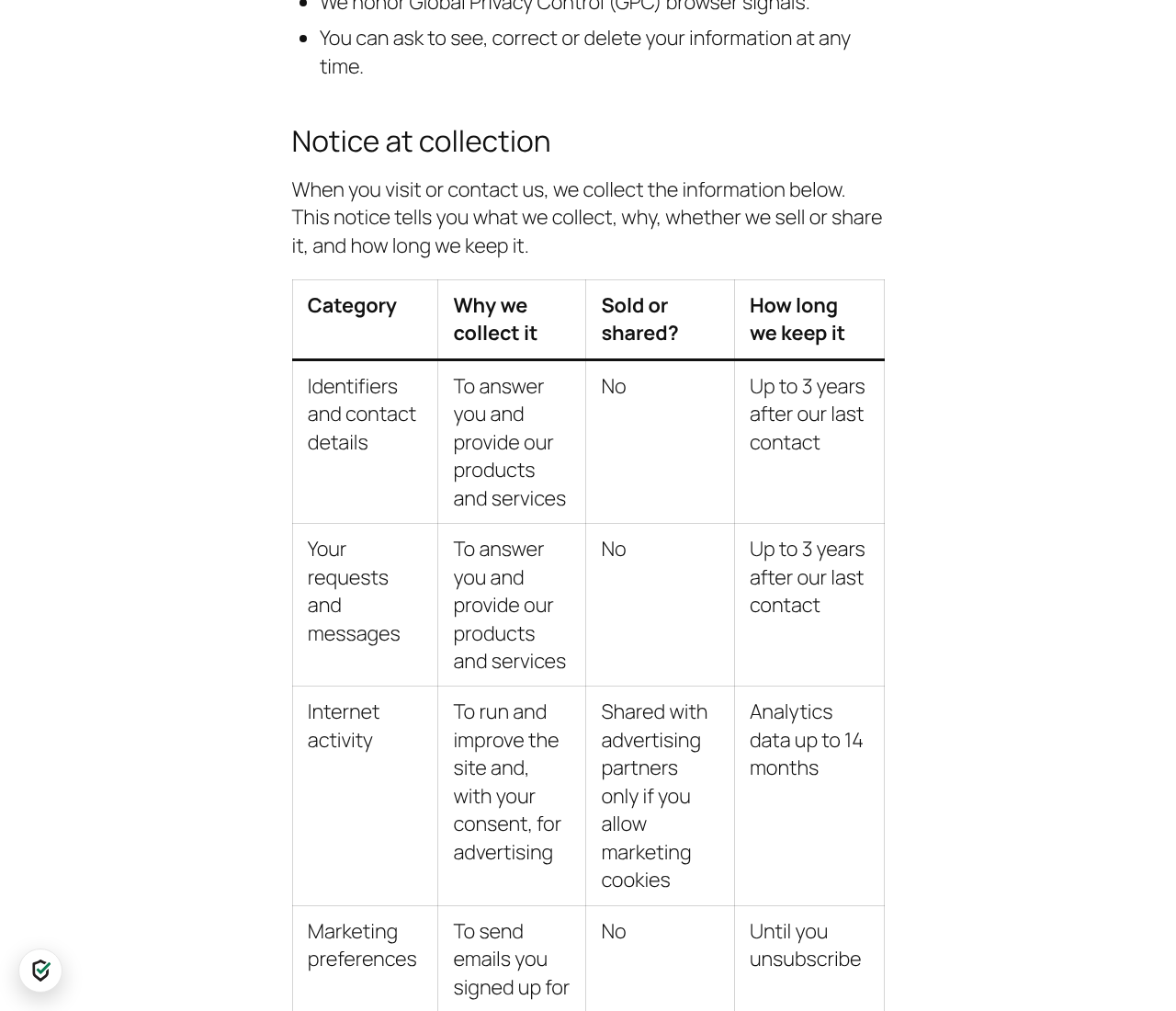
- Notice at Collection section in your Privacy Policy (what you collect, why, whether it is sold or shared, how long you keep it), linked from the banner and Your Privacy Choices.
- Looks right on any theme. GoConsent styles the pages it builds, so themes that pad every block don’t leave large gaps.
- Works with your editor: the block editor, the classic editor, Elementor and Beaver Builder.
- Safe updates. GoConsent updates only its own sections, keeps your edits, and lets you undo any change.
- Dynamic shortcodes keep your business name, website address, contact form link and last updated” date current.
Privacy laws in plain English
- Which laws likely apply to you, based on where your customers are, your size and your industry: CCPA/CPRA (California), CalOPPA, Colorado, Connecticut, Delaware, Indiana, Iowa, Kentucky, Maryland, Minnesota, Montana, Nebraska, New Hampshire, New Jersey, Oregon, Rhode Island, Tennessee, Texas, Utah and Virginia, plus Washington’s My Health My Data Act, COPPA, GLBA, GDPR, UK GDPR and PIPEDA.
- Laws coming soon (such as Oklahoma, Louisiana, Alabama and Vermont) are flagged before they start.
- Industry checks for health, kids, real estate, restaurants and finance.
Built for everyone
- Accessible: built to WCAG 2.2 AA guidelines, with real buttons and dialogs, keyboard support, visible focus, screen reader labels, contrast-checked colors, 24px touch targets, and page focus kept clear of the open banner.
- Your team works undisturbed: administrators and editors never see the banner, so page builders and admin tools keep working. Authors and contributors skip it too unless you untick them.
- Preview the banner exactly as visitors see it, and keep it on while you click around.
- Multisite: network activation sets up every site, and each site keeps its own settings and records.
What the laws ask for, and where GoConsent helps
- Clear choices before tracking (GDPR, UK GDPR, CCPA and US state laws): a banner with equal Accept and Reject, and tracking held until a choice.
- Opt-out of sale, sharing and targeted advertising (California and most US state laws): the Marketing switch, Your Privacy Choices” with the official icon, and Opt out using your email” for data outside the browser.
- Honor Global Privacy Control: required in California, Colorado, Connecticut, Delaware, Maryland, Minnesota, Montana, Nebraska, New Hampshire, New Jersey, Oregon and Texas. On by default, told to the visitor, and applied on every device a signed-in visitor uses.
- Notice at collection (California): in the banner links, Your Privacy Choices and your Privacy Policy.
- Act on opt-out requests within 15 business days, with no ID check (California): the Requests tab, deadline countdown and reminder emails.
- Keep records (California: 24 months): proof of consent and request records, kept 24 months.
- Up-to-date privacy policy (CalOPPA, Delaware and all state laws): policy pages written from your scan and settings, drafted to include the rights, appeals and contact details the laws describe. Review them with your lawyer.
- Consumer health data (Washington, Nevada), children (COPPA) and financial information (GLBA): industry checks and, in Pro, dedicated policy pages.
Cookie-free traffic stats and proof of consent
- Visitors, pages, sources, devices and UTM campaigns, counted on your own server with no cookies and no stored IP addresses, so you keep seeing traffic even when visitors reject analytics.
- In Pro: calls, form sends, directions, AI and search traffic, countries, busiest hours and broken pages. Still no cookies.
- Proof of consent for every choice: a random consent ID, time, policy version and anonymized IP, kept 24 months and downloadable as CSV.
GoConsent Pro
Pro is for businesses that want more from their website:
- Know which visits become customers. Calls, form sends, directions and emails counted per page, plus where visitors came from (search, AI assistants, social), countries and busiest hours. Still no cookies, with a Dashboard widget.
- Stay current when laws change. When a privacy law starts to apply to you, GoConsent writes the new policy wording and waits for your OK. Email alerts for new laws and new trackers, and a monthly report.
- Have proof if you’re ever challenged. Evidence scans with a PDF report for your lawyer, Consent ID lookup with printable receipts, and every version of your policies saved with dates.
- Thirteen more policy pages: Terms & Conditions, Disclaimer, consumer health data, financial incentive, children’s privacy, SMS terms, DMCA, affiliate disclosure, earnings disclaimer, medical disclaimer, email policy, comment policy and Impressum.
- More tools: copy and delete requests with deadlines, a this policy changed” notice, banner rules by region, an age gate, settings export and import, and on Business and Agency, all your sites in one view.
GoConsent is a compliance tool, not legal advice. Have a lawyer review your policies.
External services
GoConsent makes no outside requests on activation, and none until an administrator accepts its terms.
- Google Fonts (fonts.googleapis.com, fonts.gstatic.com) — optional, off by default. Only when you turn on Host Google Fonts on this site (Consent tab), and only for Google Fonts your theme or plugins already load, your server downloads those font files once and GoConsent serves them from your own site, so visitors’ browsers never contact Google. The request contains the font stylesheet address and no visitor or site data. Google’s terms: https://policies.google.com/terms and privacy policy: https://policies.google.com/privacy
Everything else stays on your site:
- The scanner requests pages of your own site: once a day after the terms are accepted, or when you click Scan now.
- Google Tag Manager (www.googletagmanager.com) — only if your site already uses it. When the scanner finds a Google Tag Manager container id (GTM-…) on your pages, your server downloads that public container file once per scan to list the tags inside it. The request contains only the container id. Google’s terms: https://policies.google.com/terms and privacy policy: https://policies.google.com/privacy
- The Powered by GoConsent” credit in Your Privacy Choices is off by default and only shows if you turn it on (Consent tab). It is a plain link to getgoconsent.com; nothing loads from it unless a visitor clicks it.
- Maps and videos (Google Maps, YouTube, Vimeo) are your site’s own embeds. GoConsent adds none; it holds them until the visitor allows them, then the visitor’s browser loads them as it normally would.
- Traffic statistics and consent records are stored in your own database and are never sent anywhere.
Developer notes
- IAB GPP:
__gpp()with the US National section (usnat), CMP ID 1 (unregistered). - REST:
POST /wp-json/goconsent/v1/requestreceives Opt out using your email” requests. - Multisite: network activation sets up every site; each site accepts the terms and keeps its own settings and records.
- JavaScript API:
GoConsent.open(),GoConsent.get(),GoConsent.loadScript( src, attrs, onload ),GoConsent.onChange( callback ). - Events:
goconsent:changeondocument;goconsent_updatein the dataLayer. - Filters:
goconsent_signatures,goconsent_scan_urls,goconsent_issues,goconsent_law_rules,goconsent_industries,goconsent_render_footer_link,goconsent_filter_page,goconsent_alert_recipients,goconsent_visitor_ip. - Action:
goconsent_loaded.
Third-party assets
GoConsent includes California’s official privacy opt-out icon (assets/img/ca-privacy-options.svg), unchanged. It is published by the California Attorney General for businesses to use on their websites with a Your Privacy Choices” link, as the California Consumer Privacy Act regulations require: https://oag.ca.gov/privacy/ccpa/icons-download. It is loaded from your own site, never from outside servers.
Screenshots
Blocks
This plugin provides 1 block.
- Legal links
Installation
- In WordPress, go to Plugins > Add New, search for GoConsent and click Install Now, then Activate.
- Open GoConsent in the admin menu and accept the terms to turn on protection.
- In Settings, set your business location, industry and where your customers are. GoConsent then checks your site against the laws that likely apply to you.
- Click Scan now on the Overview, fix what the report shows, and create your policy pages in Tools.
FAQ
-
Does GoConsent help with CCPA and CPRA?
-
GoConsent gives you tools for key California requirements: an opt-out for the sale and sharing of personal information, Global Privacy Control support, a Your Privacy Choices” link with the state’s official opt-out icon, and a privacy policy that covers your rights. Compliance also depends on how your business handles data, so have a lawyer review your setup.
-
Does it work for GDPR and the UK?
-
It’s built for it. Visitors choose before any analytics or advertising cookies load, and the Privacy Policy includes a legal basis section when you serve the EU or UK.
-
Does it really block Google Analytics and the Meta Pixel before consent?
-
Yes. Tracking tags are held until the visitor agrees, including tags added later by other scripts. Google Consent Mode v2 is set to denied” by default.
-
Does it work with Elementor, Beaver Builder and page caching?
-
Yes. The banner works with any theme and with page caching. Policy pages can be created and updated in the block editor, the classic editor, Elementor and Beaver Builder.
-
One first-party cookie,
goconsent, remembers each visitor’s choice for 12 months. Traffic statistics use no cookies. -
Will visitors who click Reject still be counted?
-
Yes, in GoConsent’s cookie-free traffic stats. They are not tracked by Google Analytics or advertising tools.
-
Can I let Google Analytics run before consent?
-
Yes, by default. Analytics before consent” (Consent tab) is on for new installs: Google Analytics counts visits from the first page, without cookies until the visitor chooses. Advertising stays blocked, visitors can still opt out, and EU & UK visitors keep analytics off until they choose. Turn it off in the Consent tab.
-
How do I add the Your Privacy Choices” link somewhere else?
-
Use the
[goconsent_choices]shortcode, or link any menu item to#privacy-choices. The floating privacy button (Consent › Banner look) can sit bottom left or bottom right, at any height, or be turned off. -
Use the
[goconsent_cookie_table]shortcode. Addcategory="analytics"(or necessary, media, marketing) to show one category. The Cookie Policy page GoConsent builds already includes it. -
Are there visit limits or a paid plan required?
-
No. The free version has no visit or page limits, needs no account and adds no forced branding. Everything runs on your own server.
-
Does it support IAB GPP and TCF?
-
GoConsent sends an IAB Global Privacy Platform (GPP) US National signal that matches each visitor’s choice and Global Privacy Control. IAB TCF (needed only for sites that serve personalized Google ads to European visitors) is not included.
-
Does it work with WooCommerce?
-
Yes. Shop managers count as staff, so the banner never gets in their way. Checkout and payment scripts (Stripe, PayPal) are treated as necessary. GoConsent also sets the WP Consent API, which WooCommerce and other plugins read to respect each visitor’s choice.
-
Does it work with caching plugins?
-
Yes. The banner and choices run in the visitor’s browser, so cached pages work. When GoConsent changes how pages load, it asks Hummingbird, LiteSpeed Cache, Breeze, SiteGround Optimizer, WP Rocket, W3 Total Cache and WP Super Cache to clear their caches.
-
Does it work on multisite?
-
Yes. Network activation sets up every site. Each site accepts the terms, chooses its settings and keeps its own consent and request records.
-
GoConsent is built to WCAG 2.2 AA guidelines: real buttons and dialogs, full keyboard use, visible focus, screen reader labels, colors adjusted to keep text readable on your brand color, 24px touch targets, and page focus kept clear of the open banner. Escape closes dialogs and returns focus where it was.
-
No. Administrators and editors never see it, so page builders and admin tools work normally. Authors, contributors and CRM roles skip it too unless you untick them. Use Preview on the Consent tab to see the banner as visitors do.
-
What happens when I delete GoConsent?
-
Deleting the plugin removes its settings, scans, reports, consent and request records, traffic stats and stored fonts from every site where it ran. Deactivating keeps everything, in case you turn it back on. If GoConsent Pro is also installed, the shared data is kept for it.
-
Does GoConsent send my data anywhere?
-
No. Scans, reports, consent records and traffic stats stay in your own WordPress database. See External services below.
Reviews
There are no reviews for this plugin.
Contributors & Developers
“GoConsent™ – Cookie Consent & Privacy Tools” is open source software. The following people have contributed to this plugin.
Contributors
Translate “GoConsent™ – Cookie Consent & Privacy Tools” into your language.
Interested in development?
Browse the code, check out the SVN repository, or subscribe to the development log by RSS.
Changelog
1.0.87
- Clearer description of what GoConsent Pro adds: leads in your stats, policy updates when laws change, and proof for your lawyer.
1.0.86
- Terms & Conditions, Disclaimer and the This policy changed” notice are now part of GoConsent Pro. Free keeps the Privacy Policy, Cookie Policy, Refund & Returns Policy and Accessibility Statement, plus everything that protects you: the banner, blocking, GPC, requests and their emails, consent records and export, scan alerts and legal links. Pages you already published stay on your site; GoConsent just stops updating them without Pro.
1.0.85
- Legal links, Automatic: prefers a menu named Legal” (or Footer”), so sites built with page builders get the links in the right menu. Links the page already has anywhere outside its header and content (a theme’s own Your Privacy Choices link, say) aren’t repeated. Logged-in staff now see the links too.
1.0.84
- Legal links now default to Automatic: the footer menu of a classic theme, inside the footer of a block theme, or the slim bar, so every site links its policy pages and Your Privacy Choices. Links the footer already has aren’t repeated. Sites that had Legal links off switch to Automatic once; turn it off in Settings › Legal links.
- Checkup: flags a site whose policy pages aren’t linked from every page, with a one-click fix.
1.0.83
- Legal links (Settings tab): link your policy pages and Your Privacy Choices from every page. Add them to your footer menu (styled by your theme), place the new Legal links” block or [goconsent_legal_links] shortcode yourself, or add a slim bar at the bottom of every page in your footer’s colors. Off by default.
- Spanish translation updated.
1.0.82
- Maintenance release, in step with GoConsent Pro 1.0.82.
1.0.81
- Maintenance release, in step with GoConsent Pro 1.0.81.
- Spanish translation updated.
1.0.80
- Spanish: GoConsent’s screens, banner, Your Privacy Choices, request form and policy pages are in Spanish when the site’s language is Spanish (Spain or Mexico). Have a native speaker review policy pages before you rely on them.
- Ready for translation: every string can be translated on translate.wordpress.org.
1.0.79
- New free policy pages: Terms & Conditions (moved from Pro and expanded), Disclaimer, and Refund & Returns Policy. Each is written from your settings and what GoConsent finds on your site (a store, user accounts, open comments, your industry).
- Policy pages are more thorough. Privacy Policy adds purchase, account and comment details, Do Not Track, data portability and withdrawing consent, California Shine the Light” and Nevada, automated decisions, breach notice, and, for EU and UK visitors, transfer safeguards and the right to complain. Cookie Policy adds first- and third-party and session cookies, Google services, browser and advertising opt-out links, and changes. Accessibility Statement follows the W3C model: conformance status, compatibility, how we check, other formats and what to do if you’re not satisfied.
- Settings › Business: optional mailing address and phone (shown in each page’s contact section) and a return window for the Refund & Returns Policy.
- Consent records: choose all records, the last 30 or 90 days, or the last 12 months before downloading the CSV.
- This policy changed” notice: when a published policy page’s text changes, visitors who chose before the change see a short notice with a link to it for 30 days, until they dismiss it or open the page. Turn it off in Settings › Policy & alerts, or stop it for one page from its card in Tools.
1.0.77
- Maintenance release, in step with GoConsent Pro 1.0.77. No changes to the free features.
1.0.76
- Maintenance release, in step with GoConsent Pro 1.0.76. No changes to the free features.
1.0.75
- Traffic: hover the Visitors, Page views, Top page and Top source numbers, or any bar, for a tooltip with the exact count, its share and the previous period, styled like the Visitors per day chart. Works with the keyboard too.
- In step with GoConsent Pro 1.0.75 (Pro adds an Account tab and support requests).
1.0.74
- Traffic › Campaigns: links tagged with utm_content are shown separately, so the Powered by GoConsent” credit shows which site each click came from (powered_by · example.com).
- Traffic is ready for GoConsent Pro’s leads and visit sources. The free stats work exactly as before.
- Scanner tab is ready for GoConsent Pro’s evidence scan. Nothing changes in the free version, and it makes no new outside requests.
1.0.73
- Requests and Overview are ready for GoConsent Pro’s copy and delete requests. Do Not Sell or Share requests work exactly as before.
- Settings › Email alerts and Consent records are ready for GoConsent Pro’s alerts and Consent ID lookup. Nothing changes in the free version.
1.0.72
- Wording no longer implies guaranteed compliance: Checkup score” replaces Compliance score,” No issues found” replaces You’re all set,” laws are shown as ones that likely apply,” and the readme says what GoConsent helps with rather than claiming compliance.
- Tagline is now Privacy compliance tools for WordPress,” under the logo, in the plugin description and in the readme.
- Your Privacy Choices: every category folds closed, and a short notice at collection says what cookies are used for (only the categories your site has) and that ad cookies can count as selling or sharing.
- Privacy policy: new Notice at Collection section (what is collected, why, whether it is sold or shared, how long it is kept), linked from Your Privacy Choices. The Overview flags it when California law applies and it is missing.
- Scanner: reads your Google Tag Manager containers and lists the ad and tracking tags inside them.
- Scanner: recognises The Trade Desk, Amazon Ads, LiveRamp, Yahoo advertising, Kargo, Eyeota, Seedtag, PulsePoint, Beeswax and DAX.
- Optional Powered by GoConsent” credit in Your Privacy Choices (off by default).
- Analytics before consent” is on by default for new installs (cookieless until the visitor chooses; ads stay blocked; EU & UK visitors unchanged). Existing sites keep their current setting.
- Overview: sites that have it off see a one-time question (Turn on / Keep off). It never comes back after either answer.
- Your Privacy Choices: the Powered by GoConsent” credit sits under the policy links, on the left.
- The credit shows the full GoConsent logo as the link, in one neutral color; it turns to the brand colors on hover and keyboard focus. It now keeps that color on sites whose link color would have overridden it.
- Banner: adds a Notice at Collection link next to Privacy Policy and Cookie Policy, and shows the Powered by GoConsent” credit (when on) at the end of the button row.
- Your Privacy Choices: Opt out using your email” sends a Do Not Sell or Share request without an account or ID. The visitor gets a receipt; you get an email, a 15-business-day countdown, a checklist and a reminder 3 business days before the deadline. Requests have their own Requests tab (with a count badge) and appear on the Overview; records are kept 24 months.
- Global Privacy Control: the notice now says the signal was honored; the Sec-GPC header is also checked on the server, and a signed-in visitor’s GPC opt-out applies on every device they sign in from.
- IAB Global Privacy Platform:
__gppAPI with the US National section, matching each visitor’s choice and GPC. - Policy pages: GoConsent owns the spacing of the pages it builds, so themes that pad every block (such as Astra) no longer leave large gaps.
- Accessibility: page focus stays clear of the open banner (WCAG 2.4.11); policy links in Your Privacy Choices have 24px targets (WCAG 2.5.8); form errors are announced.
- Scanner: recognises session recorders (FullStory, Mouseflow, Lucky Orange, Smartlook, LogRocket, Crazy Egg, Inspectlet), product analytics (Mixpanel, Heap, Segment, Amplitude, Plausible, Matomo Cloud, StatCounter, comScore) and more ad tags (Quora, Taboola, Outbrain, Nextdoor, ZoomInfo, Leadfeeder, Klaviyo, Mailchimp, ActiveCampaign, Tatari, PubMatic, Magnite, OpenX, Index Exchange, Media.net).
- Multisite: network activation and deletion cover every site in the network.
- Preview: the banner preview stays on while you click around the site.
- Staff: administrators and editors always skip the banner; authors and contributors skip it by default, and you can now untick them (for example, outside writers).
1.0.71
- Real estate: the listing maps and video tours check now runs only when the scan finds maps or videos on the site.
- Suggested privacy policy wording for listing maps and video tours.
- Overview: an item without suggested wording offers Review policy instead of an empty panel.
1.0.70
- Plugin homepage: getgoconsent.com.
1.0.69
- Privacy button: 48px, with the shield icon optically centered.
- Tools: on sites built with Beaver Builder or Elementor, policy pages are built in the same builder layout as a similar page on the site (title banner, page width, text styles).
- Tools: an existing policy is updated section by section. GoConsent adds what’s missing and keeps your own sections; it offers to replace WordPress sample text.
- Tools: the preview lists every change with a checkbox and shows the page as it will read. Changes you untick are remembered.
1.0.68
- Nothing runs in the background, and no outside request is made, until an administrator accepts the terms. Activation only creates the database tables.
- Google Fonts hosting is now opt-in (Consent › Host Google Fonts on this site), off by default. Downloads use the WordPress HTTP API only.
- Google Fonts addresses with several weights (e.g. wght@400;700) are copied in full.
- Output escaping tightened in the banner, privacy button, cookie tables and footer link.
1.0.67
- Accessibility: button and link text now meet WCAG AA contrast with any banner color. Light brand colors get dark text automatically.
- Accessibility: the cookie list in the Cookie Policy can be scrolled with the keyboard.
1.0.66
- New: Banner setting with US opt-out (no banner)”. US visitors get no banner; analytics runs, marketing stays off, and Your Privacy Choices and Global Privacy Control stay in force. Only available when the scan finds no ad tags or session recording; EU & UK visitors always get the banner.
- If a later scan finds an ad tag or session recording, the banner comes back on its own and the compliance report flags it.
1.0.65
- Banner on phones: Save My Choices” sits on its own row below Reject All and Accept All.
1.0.64
- Banner: Save My Choices” is always shown, so visitors can keep the choices on screen without picking Reject All or Accept All.
1.0.63
- Your Privacy Choices: Marketing & advertising no longer folds; its opt-out line and cookie list are always in view.
1.0.62
- Readme: credits the source of California’s opt-out icon.
1.0.61
- The Your Privacy Choices” link now carries California’s official opt-out icon, as the state requires for that link title. Footer link and [goconsent_choices] alike.
- The icon also sits beside the Your Privacy Choices title.
- Your Privacy Choices: each category folds open, so the panel is shorter. Names, cookie counts and switches stay in view; the marketing opt-out line always shows.
1.0.60
- Banner styles are now passed with wp_add_inline_script() and applied by the script; no inline style tags are printed.
1.0.59
- GoConsent no longer touches back-office requests: wp-admin, AJAX, REST and cron pages are never buffered, rewritten or shown the banner. Fixes Google Maps staying blocked inside standalone CRM pages.
- Staff don’t get the banner or blocking: anyone who can edit content, plus CRM roles (MLS Genie, Jetpack CRM, WP ERP, Groundhogg, WooCommerce and any role with crm” access). Choose the roles under Consent › Protection › Staff. Visitors and clients with accounts still get the banner.
- New goconsent_skip_request filter: return true to leave a request alone. Also goconsent_staff_roles and goconsent_is_staff.
- Open site” previews the banner for staff.
1.0.58
- Cookie list: ConvertBox is described as pop-ups for offers, announcements and notices, not only promotions.
1.0.57
- Banner: category switches (Necessary, Analytics, Maps & videos, Marketing) right on the banner. Save My Choices” appears once a visitor changes one; Reject All and Accept All stay equal. Customize” is now Cookie details”.
- Cookie declaration: every cookie and tracker found by the GoConsent™ scan, with provider, purpose, type and how long it lasts, listed by category in Your Privacy Choices and the Cookie Policy.
- New [goconsent_cookie_table] shortcode; the generated Cookie Policy page now includes it, so the list stays current after every scan.
- Consent receipt: Your Privacy Choices shows the visitor’s Consent ID, when it was saved and what it allows, with a Copy button.
- Privacy button: a floating GoConsent shield reopens Your Privacy Choices after a choice. On/off, bottom left or right, and height are under Consent › Banner look.
- Global Privacy Control notice now shows on the banner itself, and the Marketing switch locks off.
1.0.56
- Contact-page lookup uses simpler database queries (passes WordPress.org Plugin Check with no errors).
1.0.55
- Deleting the other GoConsent copy (free or Pro) no longer shows There has been a critical error”, and the shared settings and data are kept.
1.0.54
- GoConsent Pro replaces GoConsent: activating Pro switches the free copy off, and all settings, scans and stats carry over.
- After moving between GoConsent and GoConsent Pro, the page cache is cleared so the banner loads from the right place.
1.0.53
- New WordPress.org description, FAQ and screenshots list.
- Traffic tab loads on sites that use plain permalinks (it showed No route was found”).
- Internal release.
1.0.52
- Tools finds existing policy pages under a parent page (such as /legal/cookie-policy/) and by title (such as Cookies Policy” or Accessibility”).
1.0.51
- Tools: the Pro badge turns green when Pro features are included.
1.0.50
- Internal release.
1.0.49
- New admin menu icon, centered.
1.0.47
- The Tools tab now sits before Settings.
1.0.46
- Privacy Policy now includes how to opt out of sale, sharing and targeted ads, so the separate Your Privacy Choices page is gone from Tools.
1.0.44
- New tagline: “Privacy compliance for WordPress,” under the logo and in the plugin description.
1.0.43
- Tools tab: Recommended pages are marked by their badge and outline only, using GoConsent’s own colors.
1.0.42
- The Tools tab now sits before Terms.
1.0.41
- New Tools tab: GoConsent builds your policy pages (Privacy Policy, Cookie Policy, Accessibility Statement) from your settings and latest scan, and marks the ones your site needs as Recommended.
- Create makes a draft for you to review and publish. Update changes only GoConsent’s own sections and keeps your edits; Undo puts the page back.
- Works with the block editor, the classic editor, Elementor (Text Editor widget) and Beaver Builder (Text Editor module).
- Dynamic codes keep names, addresses and dates current: [goconsent_site_name], [goconsent_site_url], [goconsent_privacy_email], [goconsent_contact_link], [goconsent_updated] (the page’s last-modified date). Your site’s own codes are used when they exist.
- More policy pages (Consumer Health Data, Financial Incentive, Children’s Privacy, SMS Terms, Terms of Use) are listed as part of GoConsent Pro.
- Google Street View now loads with Maps & videos (it was waiting for advertising consent).
- The privacy-rights check also recognizes know and access … correct … delete” wording.
1.0.40
- Privacy page checks no longer use an old copy of the page when the site is in maintenance mode or the page can’t be fetched; they read the saved page instead.
- Elementor and Beaver Builder privacy pages: wording added in the builder is found right away.
- Suggested wording shows &” in business names correctly (was &”).
1.0.39
- Privacy pages built with Beaver Builder or Elementor get Copy & fix” again (they were mistaken for theme-built pages).
1.0.38
- Settings > Who you serve: states are listed A–Z down each column (one column on phones). New boxes above them for United States (selects every state), Canada, European Union and United Kingdom.
1.0.37
- After updating, WordPress no longer keeps showing There is a new version” for the version you just installed.
1.0.36
- New Laws tab: a plain-English card for each privacy law GoConsent checks (who it covers, what it asks of you, citation, link to the official text). Laws that apply to you come first, then laws starting soon; other laws are collapsed and searchable.
- On the Overview, Required by” names link to that law’s card.
1.0.35
- The report now knows which privacy laws apply to your business. Settings > Who you serve asks where your customers are and your size; GoConsent checks 24 state privacy laws (including Oklahoma, Louisiana, Alabama and Vermont, enacted in 2026), California, Delaware and Nevada website-notice laws, Washington and Nevada health data laws, COPPA, GLBA, GDPR, UK GDPR and PIPEDA.
- Checks a law requires show as warnings and name the law. Everything else is a best-practice tip that doesn’t lower your score, with suggested wording.
- Laws starting soon (or thresholds dropping, like Delaware in 2027) are flagged ahead of time.
- New check: Consumer Health Data Privacy Policy for health businesses serving Washington or Nevada.
- Rules reviewed 2026-10-09. Not legal advice.
1.0.34
- Copy” sits next to Copy & fix”, for the next issues once the editor is already open.
1.0.33
- Copy & fix” copies the suggested wording and opens the privacy page in its editor (block editor, Elementor or Beaver Builder) in a new tab. Review policy” opens it for the yearly review.
- Add to Privacy Policy” only shows for pages made with the WordPress editor, where the added text reaches visitors.
- Coming back to GoConsent after editing re-checks the privacy policy automatically.
1.0.32
- New Restaurant industry (Settings): checks the privacy policy covers reservation and ordering services, allergy and dietary notes, loyalty and gift card programs (California Notice of Financial Incentive) and marketing emails and texts, with suggested wording for each. Choosing it turns on maps by default.
1.0.31
- Restaurant booking and ordering widgets (Resy, OpenTable, Tock, SevenRooms, Toast) are recognised as necessary, so they keep working and aren’t flagged for review.
1.0.30
- Scanner requests pages with WordPress’s own user agent, so host firewalls that block scanner” user agents let it through.
- When a page is blocked, the scan message quotes the error page and names the web server, to show who blocked it.
1.0.29
- Internal release.
1.0.28
- Scanner works with Defender’s Empty headers” bot protection turned on (it now sends standard request headers).
1.0.27
- When a firewall blocks the scanner, GoConsent names it (Defender, Wordfence, Solid Security, Sucuri, Cloudflare, ModSecurity or the web host) and shows the server IP address to allowlist.
1.0.26
- On phones, the admin tabs become a dropdown.
1.0.25
- Scanner reads pages on hosts where a site can’t verify its own SSL certificate when calling itself (same rule WordPress uses for its own checks).
- Some pages couldn’t be scanned” now says why: firewall, timeout, SSL, connection, password protection or server error.
1.0.24
- Internal release.
1.0.23
- Mobile banner: text, policy links, Reject All / Accept All and Customize are centered.
1.0.22
- Re-ask all visitors” confirms in a GoConsent dialog, centered and in GoConsent colors, instead of a red Click again to confirm” button.
1.0.21
- More space between text and buttons in the banner, Your Privacy Choices and the map and video notices.
1.0.20
- Browsers always load the current GoConsent files after an update, even on sites where another plugin rewrites file version numbers.
1.0.19
- The banner, Your Privacy Choices and the Cookie Policy now render in their own Shadow DOM, so theme and page-builder styles (including !important rules) can no longer change them. Older browsers fall back to the scoped stylesheet.
1.0.18
- Region-aware defaults (on by default): visitors in Europe (EU, EEA, UK, Switzerland) get analytics and maps & videos off until they choose, as GDPR expects, even where the site turns them on by default for US visitors. Detected from the browser’s time zone, so it works behind page caches and nothing is sent anywhere. Banner and cookie policy wording follow.
1.0.17
- New Maps & videos” choice in Your Privacy Choices (Google Maps, YouTube, Vimeo), separate from marketing. Visitors who leave it off can still load each map or video with a click.
- New Maps & videos on by default” setting. Choosing Real estate as the industry turns it on, so listing maps and video tours load without a click; visitors can turn them off.
- New Real estate industry check: the privacy policy should mention maps and video tours.
- Your Privacy Choices notes that some features, like maps and videos, won’t load unless allowed.
- Proof-of-consent records and CSV include the Maps & videos choice.
1.0.16
- Plugin details no longer warn not tested with your version of WordPress” on point releases (for example 7.1.3 when tested up to 7.1).
1.0.15
- New GoConsent™ logo in the admin header and new shield icon in the admin menu.
1.0.14
- Code review pass for the WordPress.org directory: database queries use placeholders for table names, PHP 8.1+ compatibility fixes, translator notes.
- Admin notices show only on the Dashboard and Plugins screens and can be dismissed.
- Suggested text for Settings Privacy Policy Guide explains the consent cookie, proof-of-consent records and cookie-free stats.
- Consent records CSV: cells a spreadsheet could run as formulas are neutralised.
- Traffic stats ignore floods (more than 300 page views an hour from one visitor).
1.0.13
- Google Fonts: when another plugin stops WordPress from downloading the fonts, GoConsent downloads them directly (server to Google, no visitor data) and, if that fails too, names the plugin in the warning.
1.0.12
- Google Fonts self-hosting works with large font sets (for example Poppins in every weight, 54 files): files download several at a time, in the background and during scans, and a run that is cut short picks up where it stopped. Visitors never wait on a download.
- Fonts loaded with a changing version number are recognised as the same font.
- The Google Fonts warning now says why the fonts aren’t copied yet (progress, blocked connection, error from Google) and what to do.
1.0.11
- Google Maps: listing galleries and other components with Map or Street View buttons are no longer covered. The photos show as normal, and the Google Maps notice appears only when a visitor clicks Map or Street View; after Load map” the map opens.
- Map buttons stay visible while Maps waits for consent, even where the component would hide them.
- Only empty map areas get the notice up front.
1.0.10
- Name shown as GoConsent™ in the Plugins list and admin menu.
1.0.9
- Internal release.
1.0.8
- New GoConsent shield icon in the admin menu.
1.0.7
- Tested with WordPress 7.1.
- Uninstall also removes script approvals and the scan lock.
- Diagnostic logging only when WP_DEBUG_LOG is on.
1.0.6
- Scanner shows what added each script: the plugin or theme, the page-builder module and page it was pasted into (with an Edit page link), or a header/footer snippet. Scripts with no identifiable source are flagged.
- Approve button for scripts that need review: one click keeps the suggested category. Approved scripts show who approved them and when, with Undo.
1.0.5
- Google Maps waits for the visitor: the Maps JavaScript API (theme and plugin loaders, including scripts that load it on the fly) and Static Maps images load only after Load map” or Accept All. Map areas show a Load map placeholder.
- New privacy policy check and suggested wording for Google Maps. The cookie policy now explains maps.
- Analytics before consent” now runs Google Analytics without cookies until the visitor chooses.
- Scanner also checks one recent item from each custom post type (listings, vehicles, products).
- Scanner is safe on small hosting plans: one scan at a time, 8-second page timeout, and it stops after two slow or failed pages or 45 seconds, so it can’t tie up the site’s PHP workers.
- Banner and dialog styles are scoped so themes and page builders can’t override them.
- Banner: Privacy Policy and Cookie Policy links sit on their own row.
1.0.4
- Privacy policy checks now read the page as visitors see it, including text built into the theme.
- When the theme builds the privacy page, Add to Privacy Policy” is hidden and the policy date is read from the page.
1.0.3
- Proof of consent: every Accept, Reject or Save is recorded (anonymized IP, 24-month retention). Download as CSV in the Consent tab.
- HQ Rental Software is labelled as adding a session ID to page URLs in the cookie policy.
1.0.2
- Banner links no longer pick up the theme’s all-caps style.
1.0.1
- Banner links: removed the forced zero padding.
1.0.0
- First release.