

Description
Smart Booking is a completely free WordPress booking plugin built specifically for consultation-style appointments tied to a person (a staff member). It is designed for use cases such as lawyers, certified professionals, marriage agencies, chiropractic clinics, and tutoring schools.
Key Features
- Completely free, no limits — There is no Pro version, no paid add-ons, and no license activation. Every feature is free.
- Ready in 5 minutes — Activating the plugin auto-creates a default store, staff member, and the three core fields (name, email, phone). Just paste the
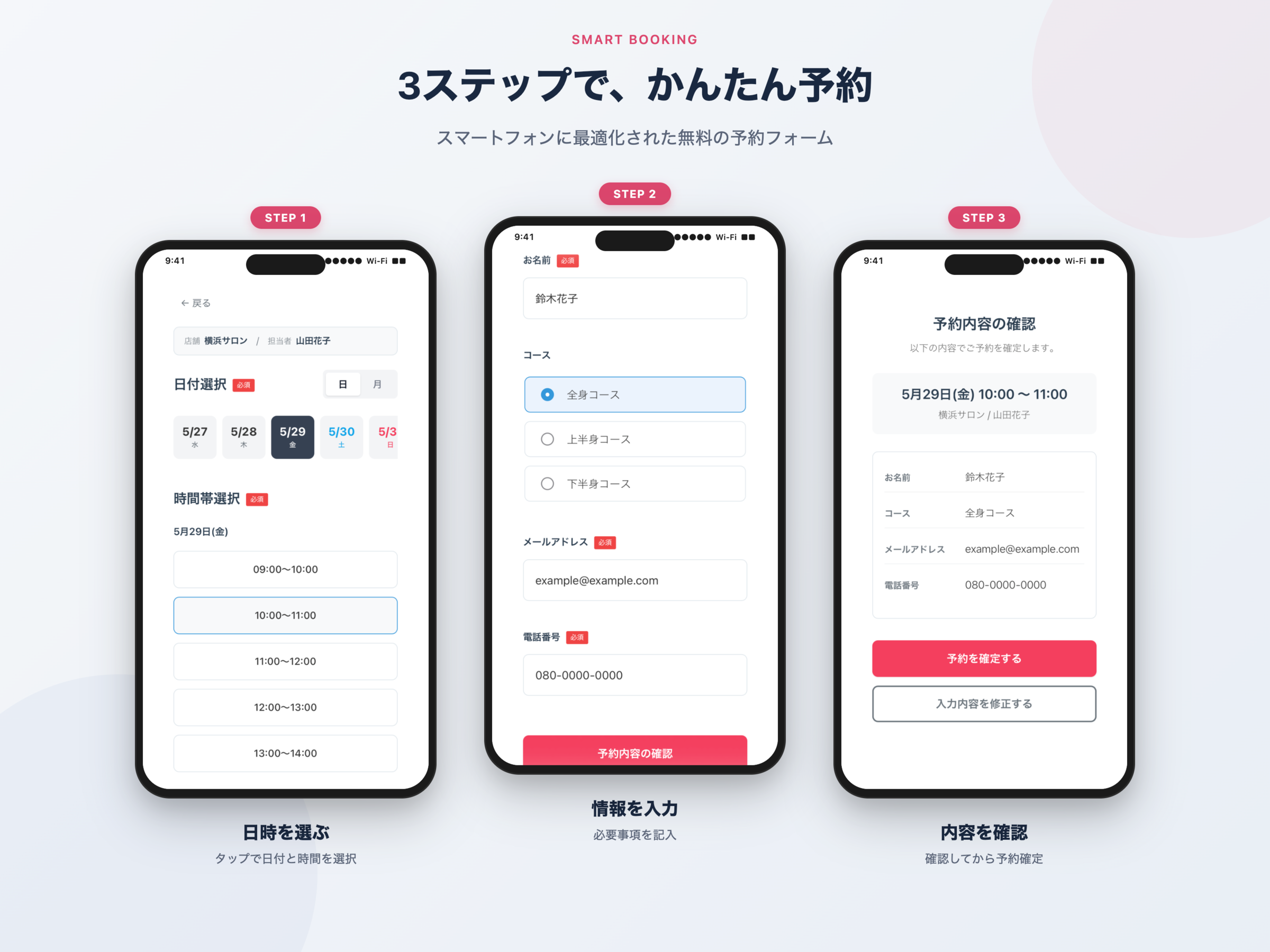
[smart_booking]shortcode into a post or page to display the booking form. - Optimized for the Japanese booking flow — A 3-step flow (input confirmation done”) that lets the customer review their entries on a dedicated confirmation screen before finalizing the booking.
- Multi-store / multi-staff management — Manage schedules per store and per staff member. Whether the store-select and staff-select steps are shown to customers is automatically decided by how many active records exist (skipped when there is only one).
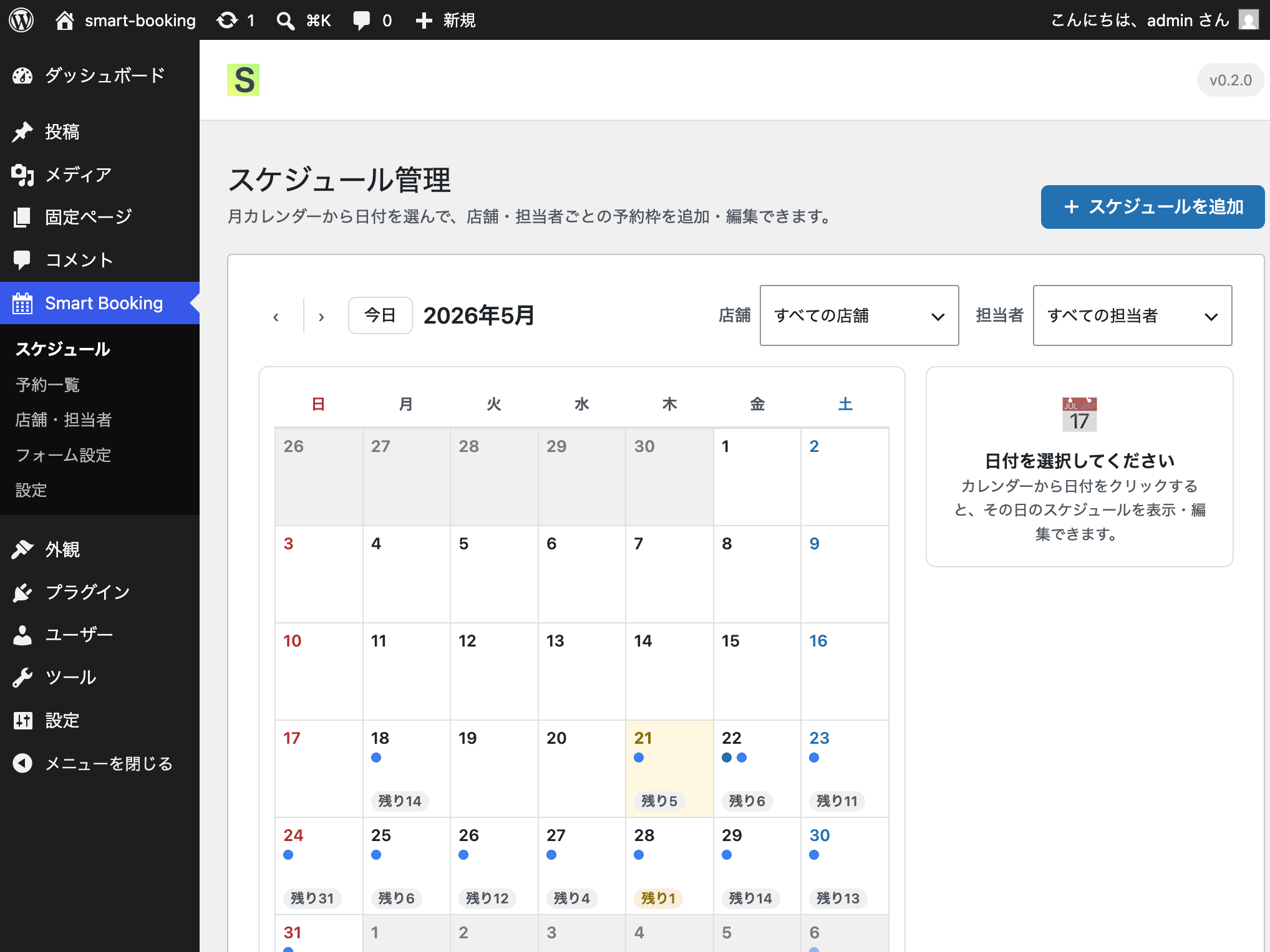
- Flexible schedule configuration — Time slots in 30 / 60 / 90 / 120-minute units, capacity per slot, weekday-pattern bulk copy, and an option to overwrite existing schedules.
- Calendar display modes — Choose between day view (horizontal scroll), month view (calendar grid), or a toggle between both, configurable from the admin screen.
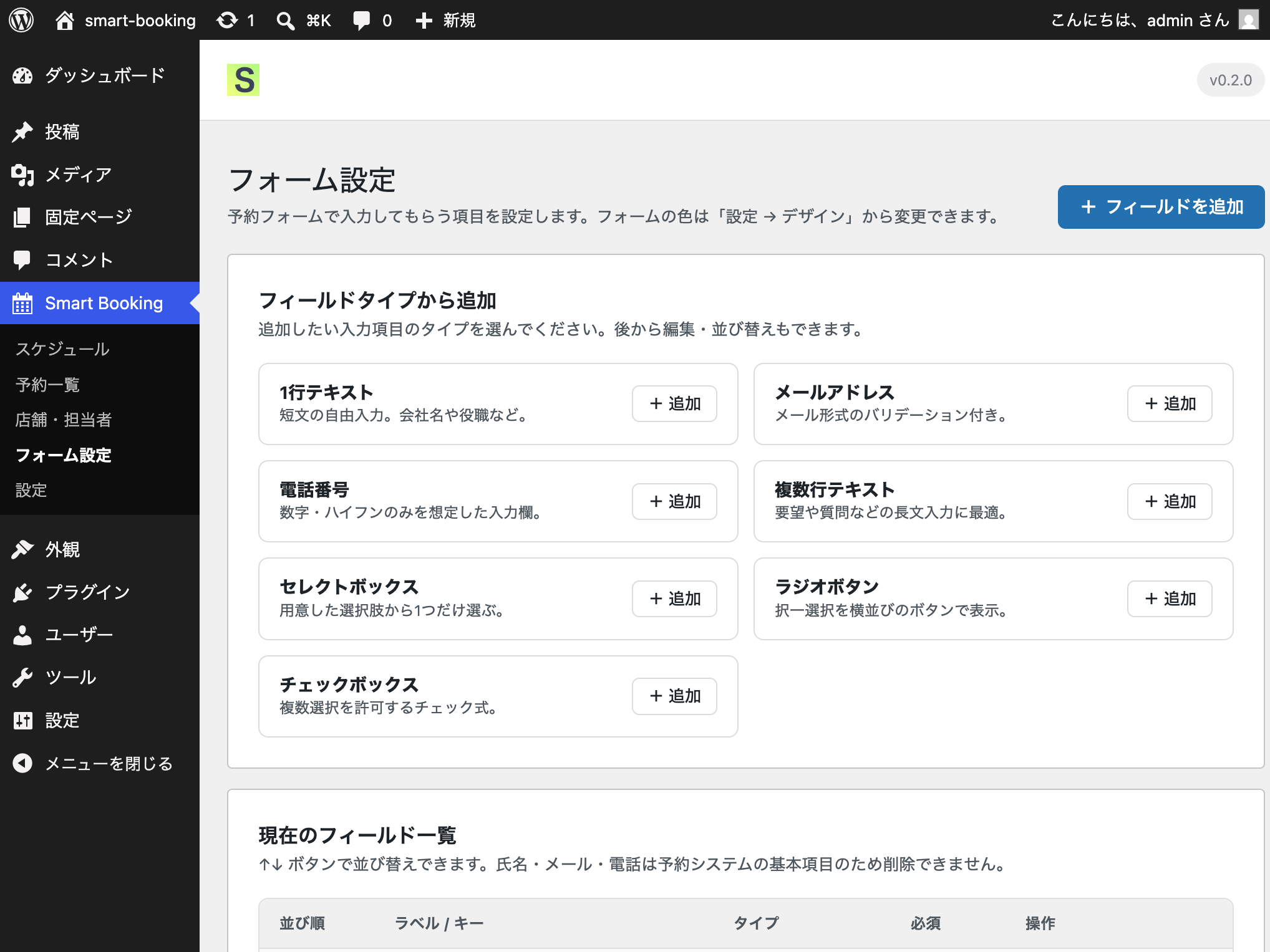
- Custom fields — In addition to the three built-in fields (name, email, phone), administrators can add text, email, phone, textarea, select, radio, and checkbox fields.
- Email notifications — Automatic emails are sent to the customer and the administrator when a booking is received, and a confirmation email is sent to the customer on approval. All templates are editable from the admin screen.
- Design customization — Button color, date-selection color, time-slot color, required-mark color, and focus color are all configurable from the admin screen.
- Concurrent booking protection — Capacity is enforced through a single atomic SQL UPDATE, preventing double-bookings when multiple users submit at the same moment.
- Google Tag Manager (GTM) integration — Each booking step (
store_select,staff_select,date_select,time_select,form_input,confirm,complete) is automatically pushed towindow.dataLayer, so you can wire up GA4 funnels and Google Ads conversion tags through GTM without writing any code. The GTM container tag itself must be installed separately on your site. - WordPress.org guideline compliant — No external CDN scripts/styles, no PHP sessions, all queries use
$wpdb->prepare(), all output is escaped, and every REST endpoint enforces nonce +current_user_can('manage_options').
Supported booking flow
[Store Select] [Staff Select] [Date Select] [Time Select] [Form Input] [Confirmation] [Done]
The store-select and staff-select steps are shown only when more than one active store / staff record exists. With a single store and a single staff member, the customer starts directly from date selection.
Optional integrations (off by default)
The following external integrations are off by default. They only initiate any outbound traffic after an administrator explicitly enables them on the Integrations” tab and provides the required credentials (API key, etc.).
- Google Calendar integration — Creates a calendar event when a booking is received and deletes it on cancellation.
- ChatWork notifications — Posts a notification message to a designated ChatWork room when a booking is received.
See the External services” section below for full details.
Customization & feature requests
For feature requests and customization inquiries, please contact the developer, Liberdade Inc., or visit our service site at wp-smart-booking.com.
Source code
The complete source code, including the un-minified JavaScript and CSS sources under src/, is publicly available on GitHub:
https://github.com/KeisukeYokoyama/SmartBooking
External services
This plugin may communicate with the following external services. Both are off by default, and outbound traffic only occurs after an administrator explicitly enables the integration on the Settings > Integrations” tab and provides the required credentials.
Google Calendar API
- Endpoint:
https://www.googleapis.com/calendar/v3/ - Purpose: Creates a Google Calendar event when a booking is received, and deletes the event when the booking is cancelled.
- Data sent: Booking date and time, customer name, store name, staff name, booking number.
- Timing: When a booking is received (event creation) / when a booking is cancelled (event deletion).
- Authentication: Service account JSON key (uploaded by the administrator on the settings screen).
- Default: Off
- Terms of service: Google APIs Terms of Service
- Privacy policy: Google Privacy Policy
ChatWork API
- Endpoint:
https://api.chatwork.com/v2/ - Purpose: Posts a notification message to a designated ChatWork room when a booking is received.
- Data sent: Customer name, booking date and time, store name, staff name, booking number.
- Timing: Immediately after a customer submits the booking form.
- Authentication: API token (entered by the administrator on the settings screen).
- Default: Off
- Terms of service: ChatWork Terms of Service
- Privacy policy: ChatWork Privacy Policy
If neither integration is enabled, Smart Booking does not make any outbound requests to external services.
Screenshots
Installation
- Upload the plugin ZIP from Plugins > Add New” in your WordPress admin, or extract the archive into
/wp-content/plugins/smart-booking. - Activate Smart Booking from the Plugins” screen.
- On activation, one default store, one default staff member, and three custom fields (name, email, phone) are created automatically.
- Configure stores, staff members, schedules, and form fields from the Smart Booking menu in the admin sidebar.
- Paste the
[smart_booking]shortcode into a post or page and publish it to display the booking form.
To restrict the form to a specific store, pass a store_id attribute, e.g. [smart_booking store_id="1"].
FAQ
-
Is the plugin really completely free?
-
Yes. There is no Pro version, no paid add-ons, and no license activation. All features are available for free.
-
Does the plugin make any outbound network requests by default?
-
No. Out of the box, Smart Booking does not contact any external service. The Google Calendar integration and ChatWork notifications only send data after the administrator explicitly enables them on the Integrations” tab and provides the necessary API credentials.
-
Is the booking form mobile-friendly?
-
Yes. The front-end booking form, confirmation screen, and completion screen are all responsive and have been verified to work on smartphone widths (375px) as well as tablets and desktops.
-
What happens when multiple customers try to book the same time slot at the same time?
-
Capacity is enforced by a single atomic SQL UPDATE statement, so no booking that exceeds the slot capacity will be accepted. If the slot fills up between page load and submission, the user will see an error message instead of a successful booking.
-
Can I configure recurring weekly schedules in bulk?
-
Yes. From the schedule management screen, choose Copy schedule” Pattern”, select the weekdays (Sun–Sat) and the date range, and the schedule will be duplicated across all matching dates. You can choose whether to overwrite existing schedules.
-
Can customers cancel their own bookings?
-
In v1, there is no customer-side cancellation. After receiving a cancellation request by phone or email, change the booking status to Cancelled” from the booking list in the admin.
-
Can I add fields to the booking form?
-
Yes. From the Form Settings” screen you can add, reorder, or remove fields of the following types: text, email, phone, textarea, select, radio, and checkbox.
-
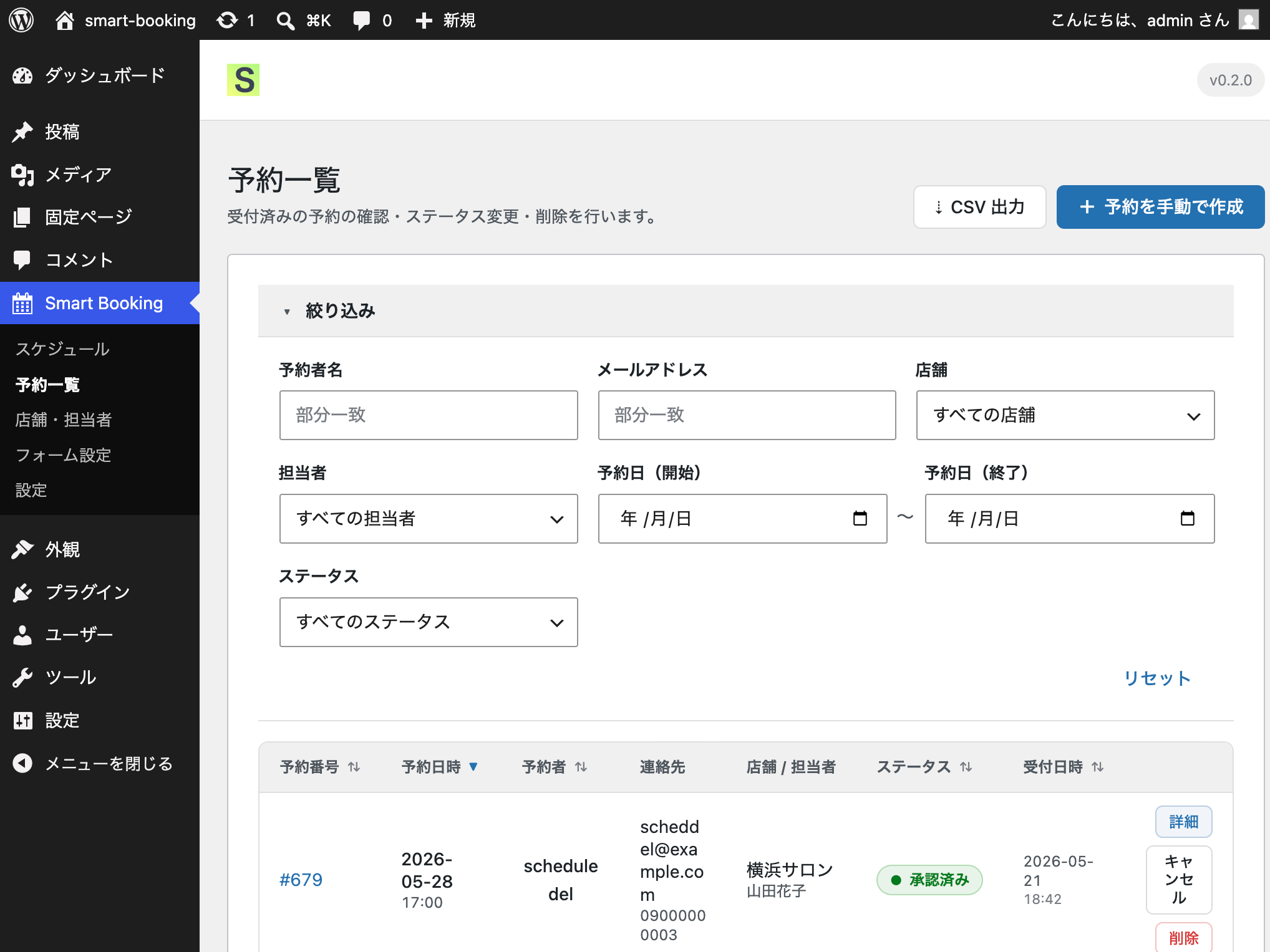
Can I export the booking list?
-
Yes. From the booking list screen, the Export CSV” button downloads the currently filtered bookings as a CSV file.
-
What happens to my data when I delete the plugin?
-
Performing the WordPress Delete” operation drops all six custom tables and removes all options created by Smart Booking. To preserve your data, only Deactivate” the plugin — do not delete it.
Reviews
There are no reviews for this plugin.
Contributors & Developers
“Smart Booking” is open source software. The following people have contributed to this plugin.
Contributors
Translate “Smart Booking” into your language.
Interested in development?
Browse the code, check out the SVN repository, or subscribe to the development log by RSS.
Changelog
0.2.2 – 2026-06-24
- Renamed: Unified the database prefix to
smart_booking_(previously a mix ofsmart_booking_andsmabo_) to address WordPress.org review feedback on prefix consistency.
0.2.1 – 2026-06-22
- Fixed: Corrected ChatWork URLs in readme.txt (terms and privacy pages).
- Improved: Excluded development files (assets/) from the distribution package.
- Added: Source code repository URL in readme.txt.
- Improved: uninstall.php now uses an explicit option list instead of a LIKE wildcard to avoid affecting other plugins.
- Renamed: Database prefix from
smb_tosmabo_to satisfy WordPress.org’s 4-character prefix requirement.
0.2.0
- Front-end UI redesign for the booking form, confirmation screen, and completion screen.
- Improved store-select and staff-select card layout (uniform card height, clickable cards, hover state).
- Added a selected info” bar that persists store and staff context after they have been selected.
- Fixed background color regression on date and time-slot selection (active state now reflects the configured color).
- Expanded responsive coverage and end-to-end test suites (picker verification, confirmation/completion screens, responsive layouts).
- Removed debug logging from the Google Calendar integration.
- Added Google Tag Manager (GTM) data-layer events for each booking step (
store_select,staff_select,date_select,time_select,form_input,confirm,complete) so GA4 funnels and Google Ads conversion tags can be wired up through GTM.
0.1.0
- Initial release.
- Booking form, store / staff management, schedule management, booking list, form settings, and a 5-tab settings screen.
- Email notifications (booking received and booking approved).
- Optional Google Calendar integration (off by default).
- Optional ChatWork notifications (off by default).